


HIKVISION 24 PORT SMART MANAGED POE SWITCH
HIKVISION 24 PORT SMART MANAGED POE SWITCH
- Brand: HIKVISION
- MPN: 301803157
- Part #: CCTHIK301803157
- UPC:
- Brand: HIKVISION
- MPN: 301803157
- Part #: CCTHIK301803157
- UPC:
Similar in-stock products available at PB Tech right now


Features
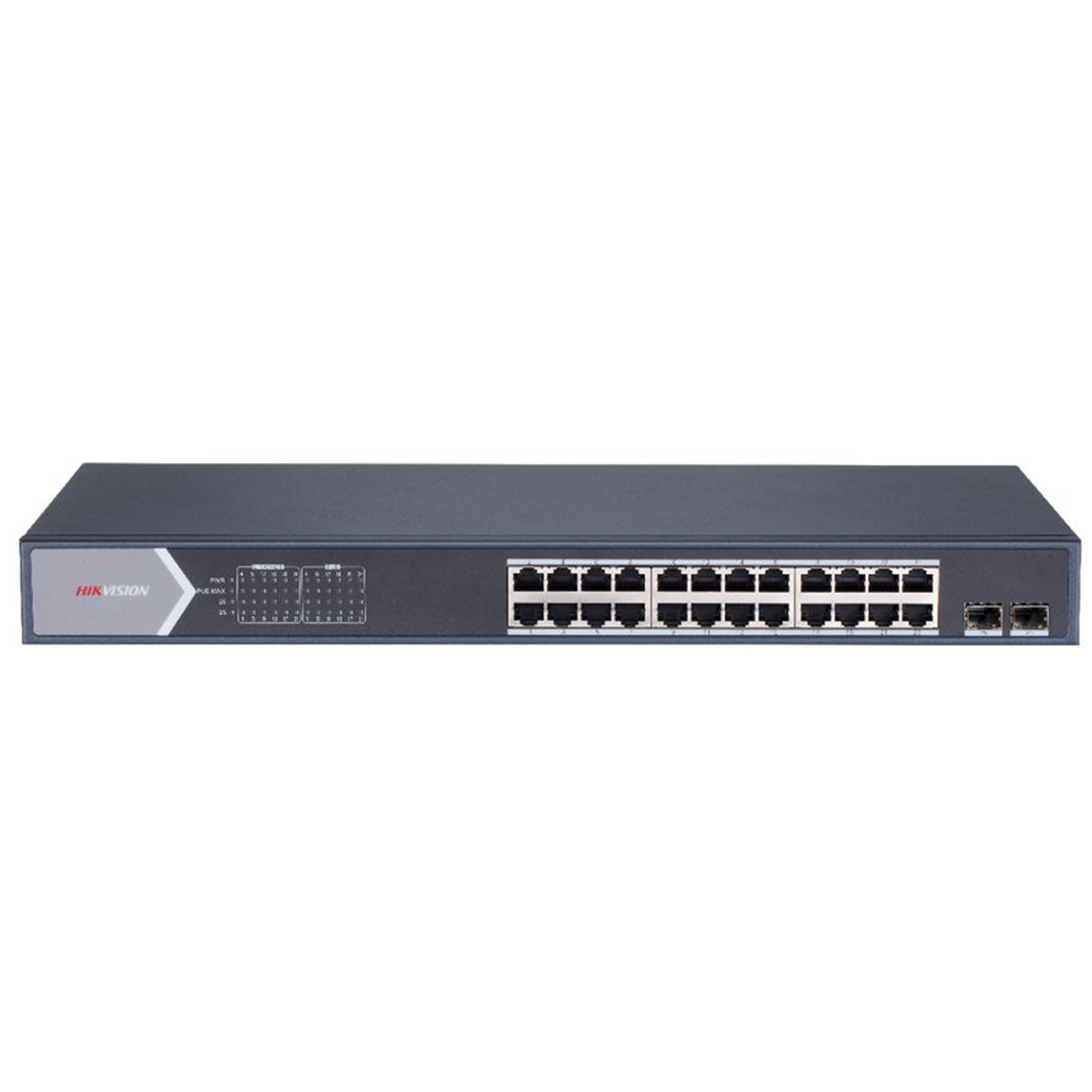
- 24 × 100 Mbps PoE RJ45 ports, 2 × gigabit combos.
- IEEE 802.3at/af standard for PoE ports.
- Network topology management, alarm push, network health monitor.
- 6 kV surge protection for PoE ports.
- AF/AT camera can reach up to 300 m in extend mode.
High-Capacity PoE for Scalable Deployments
The Hikvision 24-Port Smart Managed PoE Switch features 24 100 Mbps PoE RJ45 ports and 2 Gigabit combo uplink ports, delivering a versatile and scalable solution for large-scale network deployments. These interfaces support simultaneous power and data for up to 24 devices such as IP cameras, access points, or VoIP phones, ideal for enterprise and surveillance environments.
Reliable Standards and Long-Range Connectivity
Each PoE port complies with IEEE 802.3af and 802.3at standards, supporting a maximum power output of 30 W per port and a total PoE budget of 370 W. The switch supports 'Extend Mode' to deliver both power and data over distances up to 300 meters (device and cable dependent), offering added flexibility for remote installations.
Advanced Network Management and Monitoring
Integrated network topology management, alarm push notifications, and network health monitoring tools provide effective and centralized network administration. With Hik-Partner Pro integration, users can activate, visualize, and manage the switch remotely, including firmware upgrades and port configuration.
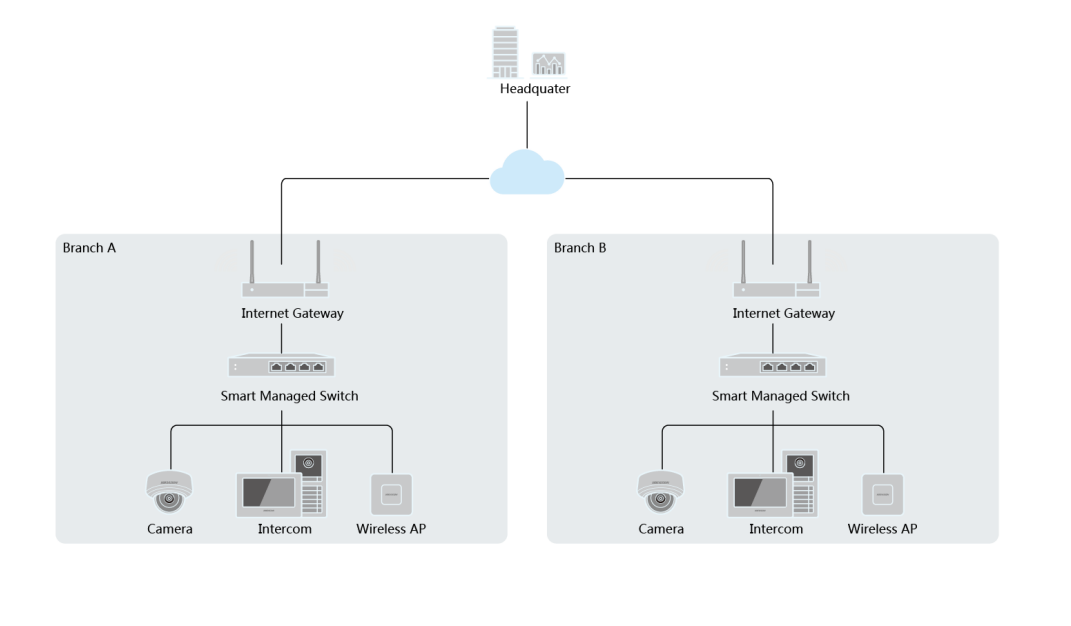
Typical Application
Specifications
Reviews
Delivery & Pick-up

Delivery Estimates
The estimated time to ship for each product we sell is detailed on the individual product page just underneath the price. From when your items ship, products typically arrive within 1-2 working days for North Island deliveries and 2-3 working days for South Island deliveries. Rural deliveries may take an extra working day. Bulk & hazard deliveries may take an extra 2-7 working days.
Next Day Delivery
Need your order in a hurry? PB Tech offers next day delivery for local Auckland addresses. Simple place your order before 4pm (provided your items are in stock) and select our next day delivery option in the checkout. T&C's apply. Learn more about Next Day Delivery.
Same Day Delivery
Need your order in a hurry? PB Tech offers same day delivery for Auckland, Hamilton, Wellington and Christchurch. Simple place your order before 1pm (provided your items are in stock) and select one of our same day delivery options 'Evening Delivery' or 'Urgent 3-hour Delivery' in the checkout. T&C's apply. Learn more about Same Day Delivery.
Shipping Costs
Shipping costs vary based on your location and the items being shipped and in some cases shipping may even be FREE.
To calculate what the shipping costs will be for your order, add the items you are interested in to your cart, view the Shopping Cart page, and select your 'Delivery Area' to calculate the shipping cost.
Shipping Security & Insurance
All orders shipped by PB Tech are sent via a courier with a signature required for each delivery. In some cases, and only where you have given the courier company permission to leave orders at a designated location, your order may be delivered without requiring a signature. All orders sent by PB Tech are fully insured in the unlikely event that your item(s) are damaged or go missing in transit.
1 Hour Store Pick-up / Click & Collect
You can pick-up your online order from any of our stores nationwide. You can select which store you want to pick up from at the checkout. Provided the store you select has stock and there's no hold-ups with payment we will have your order ready within 1 hour (during normal trading hours for that store) otherwise it may take up to 5 working days to transfer the stock to the store so your order can be fulfilled. Learn more about our Click & Collect process.
Overseas Shipments
PB Tech regularly ships overseas to Australia and beyond. If you are located in Australia, you can order directly from our Australian site www.pbtech.com/au. If you are from another country you can order from www.pbtech.com
Returns & Warranty
Related Promotions

Popular Switches

 Ubiquiti UniFi USW-Flex-Mini 5-Port Gigabit L2 Managed Switch -...

 TP-Link TL-SG1005D 5-Port Gigabit Desktop Switch

 TP-Link TL-SG108 8-Port Gigabit Unmanaged Switch - 1GbE x8

 Ubiquiti UniFi USW-Lite-8-POE 8-Port Gigabit L2 Managed PoE...

 TP-Link TL-SG108PE 8-Port Gigabit Easy Smart PoE Switch with 4...


HIKVISION 24 PORT SMART MANAGED POE SWITCH
- Brand: HIKVISION
- MPN: 301803157
- Part #: CCTHIK301803157
Product URL: https://www.pbtech.co.nz/product/CCTHIK301803157/imgad/aib/BL_20251121115503.png
| Branch | New Stock | On Display |
|---|---|---|
| Auckland - Albany | 0 | |
| Auckland - Glenfield | 0 | |
| Auckland - Queen Street | 0 | |
| Auckland - Auckland Uni | 0 | |
| Auckland - Westgate | 0 | |
| Auckland - Penrose | 0 | |
| Auckland - Henderson (Express) | 0 | |
| Auckland - St Lukes | 0 | |
| Auckland - Manukau | 0 | |
| Hamilton | 0 | |
| Tauranga | 0 | |
| New Plymouth | 0 | |
| Palmerston North | 0 | |
| Petone | 0 | |
| Wellington | 0 | |
| Auckland - Head Office | 0 | |
| Auckland - East Tamaki Warehouse | 0 | |
| Christchurch - Hornby | 0 | |
| Christchurch - Christchurch Central | 0 | |
| Dunedin | 0 |
Features
- 24 × 100 Mbps PoE RJ45 ports, 2 × gigabit combos.
- IEEE 802.3at/af standard for PoE ports.
- Network topology management, alarm push, network health monitor.
- 6 kV surge protection for PoE ports.
- AF/AT camera can reach up to 300 m in extend mode.
High-Capacity PoE for Scalable Deployments
The Hikvision 24-Port Smart Managed PoE Switch features 24 100 Mbps PoE RJ45 ports and 2 Gigabit combo uplink ports, delivering a versatile and scalable solution for large-scale network deployments. These interfaces support simultaneous power and data for up to 24 devices such as IP cameras, access points, or VoIP phones, ideal for enterprise and surveillance environments.
Reliable Standards and Long-Range Connectivity
Each PoE port complies with IEEE 802.3af and 802.3at standards, supporting a maximum power output of 30 W per port and a total PoE budget of 370 W. The switch supports 'Extend Mode' to deliver both power and data over distances up to 300 meters (device and cable dependent), offering added flexibility for remote installations.
Advanced Network Management and Monitoring
Integrated network topology management, alarm push notifications, and network health monitoring tools provide effective and centralized network administration. With Hik-Partner Pro integration, users can activate, visualize, and manage the switch remotely, including firmware upgrades and port configuration.
Typical Application
Specifications
General
Shell
Metal material
Net Weight
2.83 kg (6.24 lb)
Dimensions (W × H × D)
440.00 mm × 44.00 mm × 221.00 mm (17.32'' × 1.73'' × 8.70'')
Operating Temperature
0 °C to 45 °C (0 °F to 113 °F)
Storage Temperature
-40 °C to 85 °C (-40 °F to 185 °F)
Operating Humidity
5% to 95% (no condensation)
Relative Humidity
5% to 95% (no condensation)
Power Supply
100~240 V AC, 50/60 Hz, Max. 6.5 A
Installation Mode
Rack (equipped with mounting ears)
Max. Power Consumption
400 W
Power Consumption in Idle
30 W
Surge Protection
6 kV
Network Parameters
Ports
24 x 10/100 Mbps PoE port, 2 x Gigabit combo
MAC Address Table
16 K
Switching Capacity
14.8 Gbps
Packet Forwarding Rate
11.01 Mpps
Internal Cache
4 Mbits
PoE Power Supply
PoE Standard
IEEE 802.3af, IEEE 802.3at
PoE Power Pin
8-pin power: 1/2(-), 3/6(+), 4/5(+), 7/8(-)
PoE Port
PoE: Ports 1 to 24
Max. Port Power
30 W
PoE Power Budget
370 W
Software Function
Long Range
Ports 1 to 24: up to 300 m.
Long range performance may vary depend on camera model or cable condition.
VIP Port
Ports 1 to 8: data on VIP ports is preferentially forwarded when bandwidth resources are insufficient.
Link Aggregation
Aggregate multiple physical ports to form a logical port for load balancing, bandwidth expansion, and port protection. Support static link aggregation. Support 1 aggregation group.
HPP
Support one-click activation and remote management via Hik-Partner Pro.
Functions supported:
1. Display the port rate.
2. Display the port bandwidth utilization rate.
3. Display the PoE power usage.
4. Display topology information.
5. Display the alarm status.
6. Restart ports and devices.
7. Enable port long-range mode.
8. Remotely upgrade the device.
System Maintenance
Support remote upgrade, recovering default parameters, viewing logs, configuring basic network parameters.
Approval
EMC
FCC (47 CFR Part 15, Subpart B); CE-EMC (EN 55032: 2015, EN 61000-3-2: 2014, EN 61000-3-3: 2013, EN 55024: 2010 +A1: 2015); RCM (AS/NZS CISPR 32: 2015); IC (ICES-003: Issue 6, 2016)
Safety
UL (UL 60950-1); CB (IEC 60950-1:2005 + Am 1:2009 + Am 2:2013); CE-LVD (EN 60950-1:2005 + Am 1:2009 + Am 2:2013)
Chemistry
CE-RoHS (2011/65/EU); WEEE (2012/19/EU); Reach (Regulation (EC) No.1907/2006)


