


Apple Mac Pro M2 Ultra
24-Core CPU - 60-Core GPU - 32-Core Neural Engine Memory - 64GB Unified Memory - 1TB of SSD Storage - Stainless Steel Frame with Feet
Out of stock
Apple Mac Pro M2 Ultra
24-Core CPU - 60-Core GPU - 32-Core Neural Engine Memory - 64GB Unified Memory - 1TB of SSD Storage - Stainless Steel Frame with Feet
- Brand: Apple
- MPN: Z1JZ
- Part #: WKSAPP92199011
- UPC:


- Brand: Apple
- MPN: Z1JZ
- Part #: WKSAPP92199011
- UPC:
Features


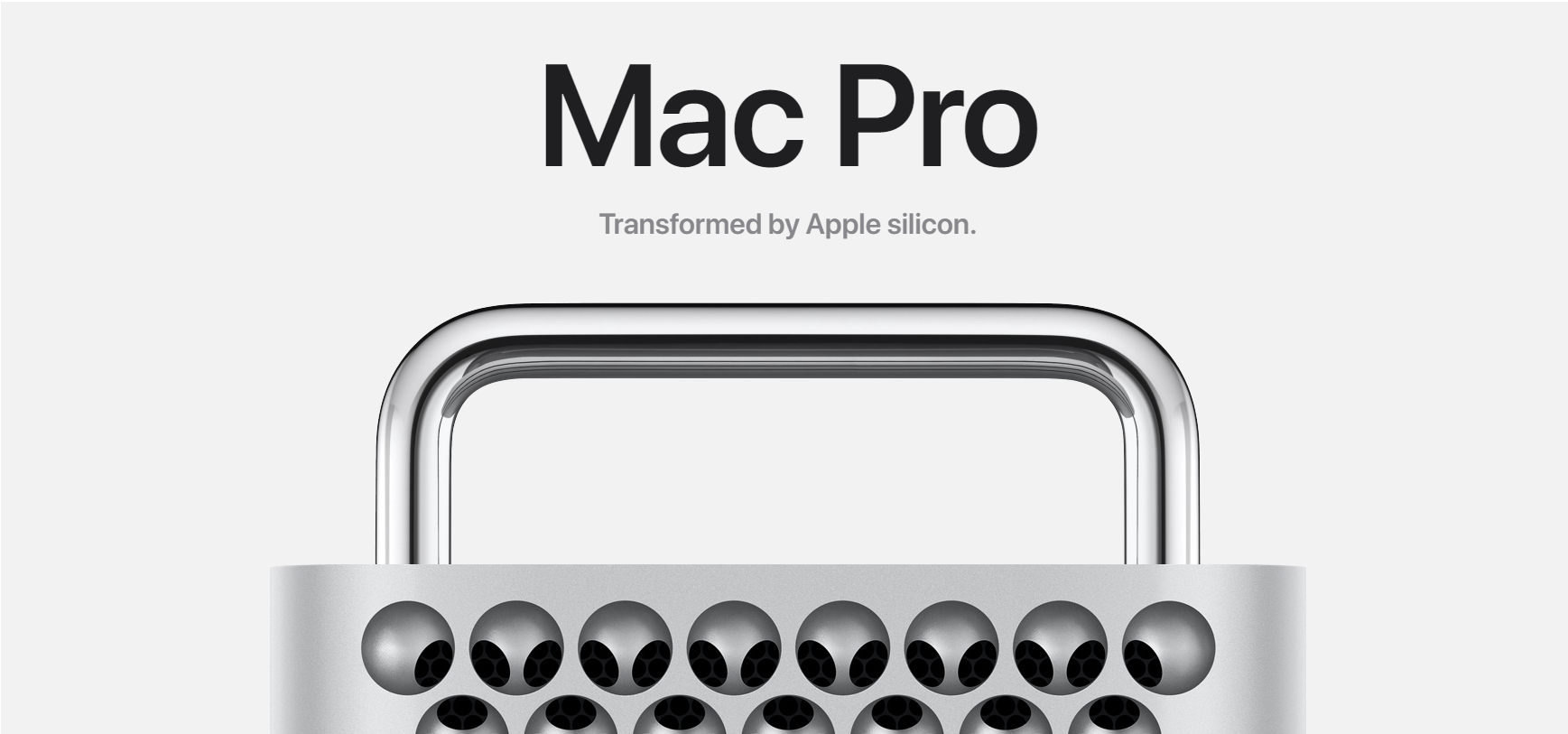
Apple Mac Pro at PB Tech

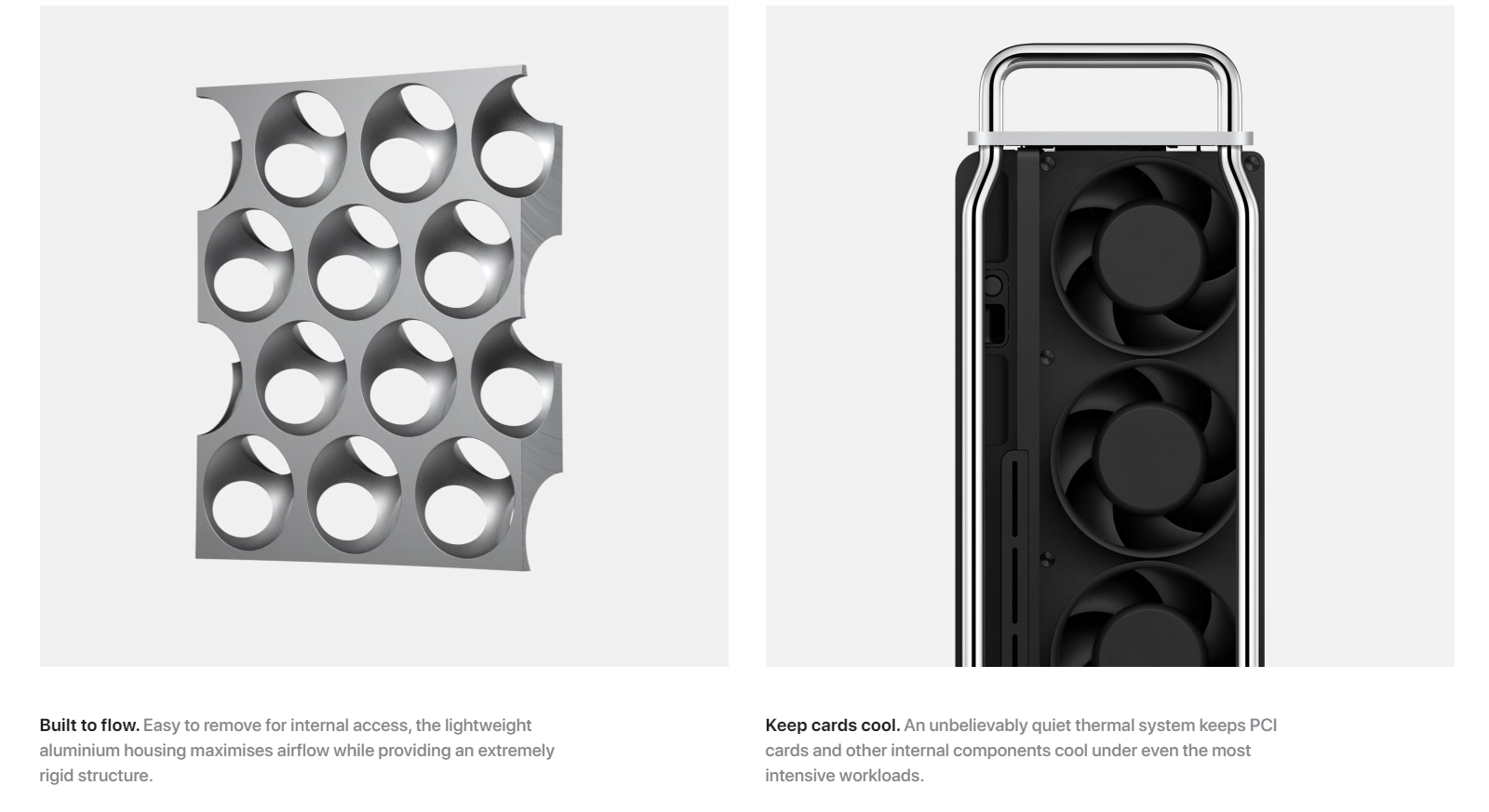

PB Tech is Apple Authorised


PB Tech is your #1 destination for all things Apple. Come see us for the latest Apple products as well as Apple authorised repairs and services including iPhone Repair, Macbook Repair and more.

Frequently asked questions
Can I swap out parts and/or add/change/remove operating systems in a PB Tech PC?
We can add any part to a PC for a small fee as long as we don't need to remove an existing part for it to fit, for example adding more RAM, an extra hard drive, installing a Windows OS, or adding a graphics card to a PC without one (we can even SLI/Crossfire for you if it is compatible). We cannot change components that are part of an existing build e.g. Upgrade an existing graphics card or add a SSD with Windows installed if the PC only has a single hard drive (as the OS is already pre-installed). If you do have a specific requirement, then one of our experienced sales team will be happy to build a system that suits your needs.
Contact our WebSales team here
What parts are used in this PC?
The parts are subject to change depending on stock availability but the specifications listed in the title will always be correct. If you have specific parts you are after, one of our experienced sales team will be happy to build a system that suits your needs.
Once again, you can contact our WebSales team here
I've just purchased my first custom PC, how do I set it up?
Our short new PC setup guide shows you how to safely unbox it, and set it all up so you can get to work or start playing games.
Specifications
Reviews
Accessories


Delivery & Pick-up

Delivery Estimates
The estimated time to ship for each product we sell is detailed on the individual product page just underneath the price. From when your items ship, products typically arrive within 1-2 working days for North Island deliveries and 2-3 working days for South Island deliveries. Rural deliveries may take an extra working day. Bulk & hazard deliveries may take an extra 2-7 working days.
Next Day Delivery
Need your order in a hurry? PB Tech offers next day delivery for local Auckland addresses. Simple place your order before 4pm (provided your items are in stock) and select our next day delivery option in the checkout. T&C's apply. Learn more about Next Day Delivery.
Same Day Delivery
Need your order in a hurry? PB Tech offers same day delivery for Auckland, Hamilton, Wellington and Christchurch. Simple place your order before 1pm (provided your items are in stock) and select one of our same day delivery options 'Evening Delivery' or 'Urgent 3-hour Delivery' in the checkout. T&C's apply. Learn more about Same Day Delivery.
Shipping Costs
Shipping costs vary based on your location and the items being shipped and in some cases shipping may even be FREE.
To calculate what the shipping costs will be for your order, add the items you are interested in to your cart, view the Shopping Cart page, and select your 'Delivery Area' to calculate the shipping cost.
Shipping Security & Insurance
All orders shipped by PB Tech are sent via a courier with a signature required for each delivery. In some cases, and only where you have given the courier company permission to leave orders at a designated location, your order may be delivered without requiring a signature. All orders sent by PB Tech are fully insured in the unlikely event that your item(s) are damaged or go missing in transit.
1 Hour Store Pick-up / Click & Collect
You can pick-up your online order from any of our stores nationwide. You can select which store you want to pick up from at the checkout. Provided the store you select has stock and there's no hold-ups with payment we will have your order ready within 1 hour (during normal trading hours for that store) otherwise it may take up to 5 working days to transfer the stock to the store so your order can be fulfilled. Learn more about our Click & Collect process.
Overseas Shipments
PB Tech regularly ships overseas to Australia and beyond. If you are located in Australia, you can order directly from our Australian site www.pbtech.com/au. If you are from another country you can order from www.pbtech.com
Returns & Warranty
Related Promotions


Popular Workstations

 PB Pro Creator RTX 5090 Studio PC AMD Ryzen 9 9950X3D 16 Cores /...

 PB Pro Creator RTX 5060 Ti 16GB Studio PC AMD Ryzen 7 9700X 8...

 PB Pro RTX A1000 Workstation PC Intel Core Ultra 7 265F 20 Cores ...

 Apple Mac Studio with M3 Ultra Chip - Silver 96GB RAM - 1TB SSD -...

 HP Z2 Tower G1i Workstation PC Intel Core Ultra 7 265 - 48GB RAM ...


Apple Mac Pro M2 Ultra 24-Core CPU - 60-Core GPU - 32-Core Neural Engine Memory - 64GB Unified Memory - 1TB of SSD Storage - Stainless Steel Frame with Feet
- Brand: Apple
- MPN: Z1JZ
- Part #: WKSAPP92199011
Product URL: https://www.pbtech.co.nz/product/WKSAPP92199011/Apple-Mac-Pro-M2-Ultra-24-Core-CPU---60-Core-GPU
| Branch | New Stock | On Display |
|---|---|---|
| Auckland - Albany | 0 | |
| Auckland - Glenfield | 0 | |
| Auckland - Queen Street | 0 | |
| Auckland - Auckland Uni | 0 | |
| Auckland - Westgate | 0 | |
| Auckland - Penrose | 0 | |
| Auckland - Henderson (Express) | 0 | |
| Auckland - St Lukes | 0 | |
| Auckland - Manukau | 0 | |
| Hamilton | 0 | |
| Tauranga | 0 | |
| New Plymouth | 0 | |
| Palmerston North | 0 | |
| Petone | 0 | |
| Wellington | 0 | |
| Auckland - Head Office | 0 | |
| Auckland - East Tamaki Warehouse | 0 | |
| Christchurch - Hornby | 0 | |
| Christchurch - Christchurch Central | 0 | |
| Dunedin | 0 |
Features
Apple Mac Pro at PB Tech
PB Tech is Apple Authorised
PB Tech is your #1 destination for all things Apple. Come see us for the latest Apple products as well as Apple authorised repairs and services including iPhone Repair, Macbook Repair and more.
Frequently asked questions
Can I swap out parts and/or add/change/remove operating systems in a PB Tech PC?
We can add any part to a PC for a small fee as long as we don't need to remove an existing part for it to fit, for example adding more RAM, an extra hard drive, installing a Windows OS, or adding a graphics card to a PC without one (we can even SLI/Crossfire for you if it is compatible). We cannot change components that are part of an existing build e.g. Upgrade an existing graphics card or add a SSD with Windows installed if the PC only has a single hard drive (as the OS is already pre-installed). If you do have a specific requirement, then one of our experienced sales team will be happy to build a system that suits your needs.
Contact our WebSales team here
What parts are used in this PC?
The parts are subject to change depending on stock availability but the specifications listed in the title will always be correct. If you have specific parts you are after, one of our experienced sales team will be happy to build a system that suits your needs.
Once again, you can contact our WebSales team here
I've just purchased my first custom PC, how do I set it up?
Our short new PC setup guide shows you how to safely unbox it, and set it all up so you can get to work or start playing games.
Specifications
Chip
Apple M2 Ultra chip
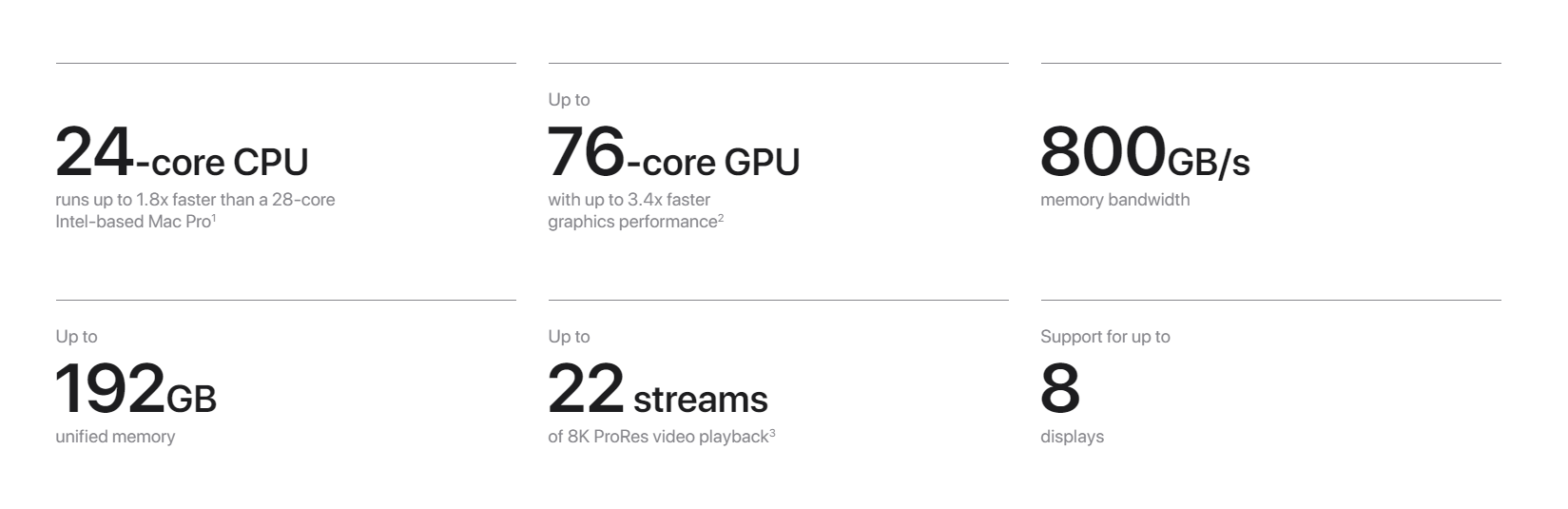
24-core CPU with 16 performance cores and eight efficiency cores
60-core GPU
32-core Neural Engine
800GB/s memory bandwidth
Media engine
Hardware-accelerated H.264, HEVC, ProRes and ProRes RAW
Two video decode engines
Four video encode engines
Four ProRes encode and decode engines
Memory + Storage
Memory
64GB RAM
Storage
1TB SSD
Display Support
Simultaneous support for up to eight displays:
Eight displays with up to 4K resolution at 60Hz
Six displays with up to 6K resolution at 60Hz
Three displays with up to 8K resolution at 60Hz
Thunderbolt 4 digital video output
Support for native DisplayPort output over USB-C
HDMI display video output (per port)
Support for one display with up to 8K resolution at 60Hz or 4K resolution at 240Hz
Support for variable refresh rate (VRR), HDR and multichannel audio
Audio
Audio
Built-in speaker
3.5-mm headphone jack with advanced support for high-impedance headphones
HDMI port supports multichannel audio output
Expansion
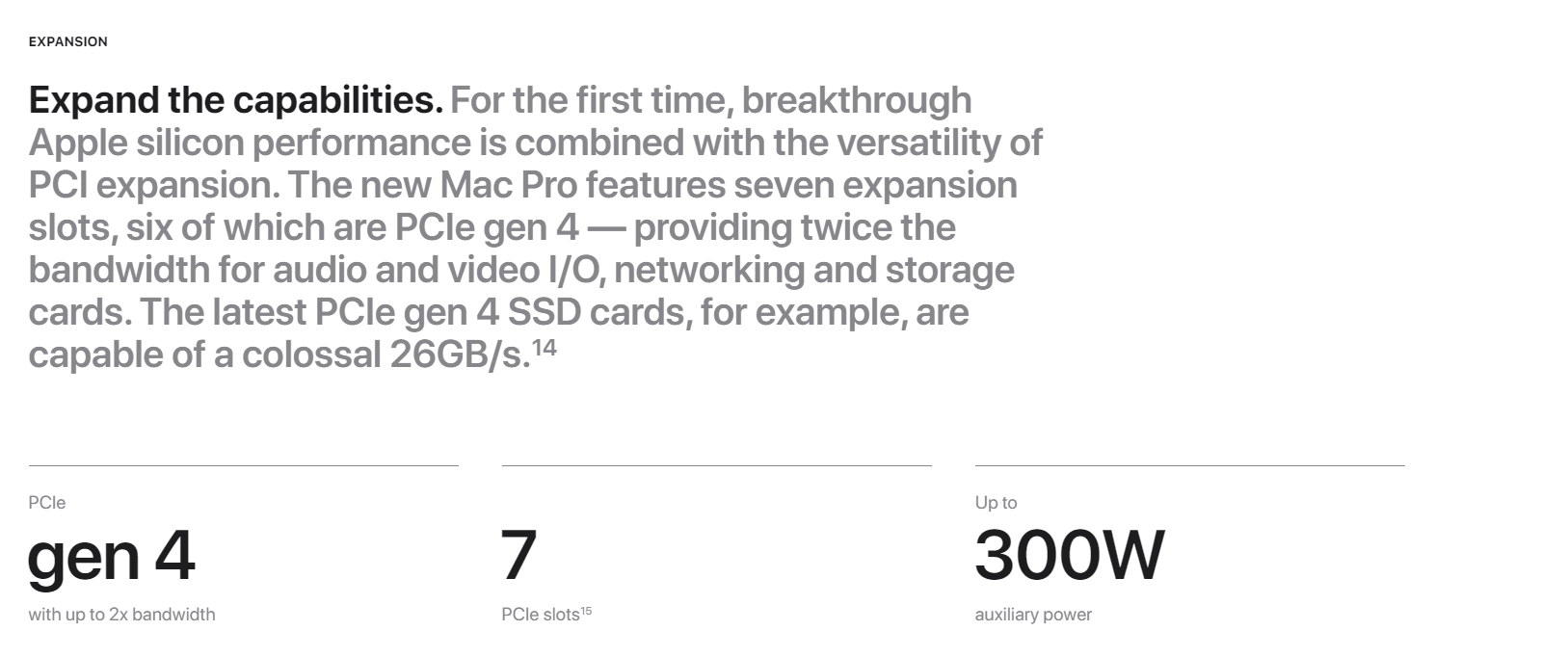
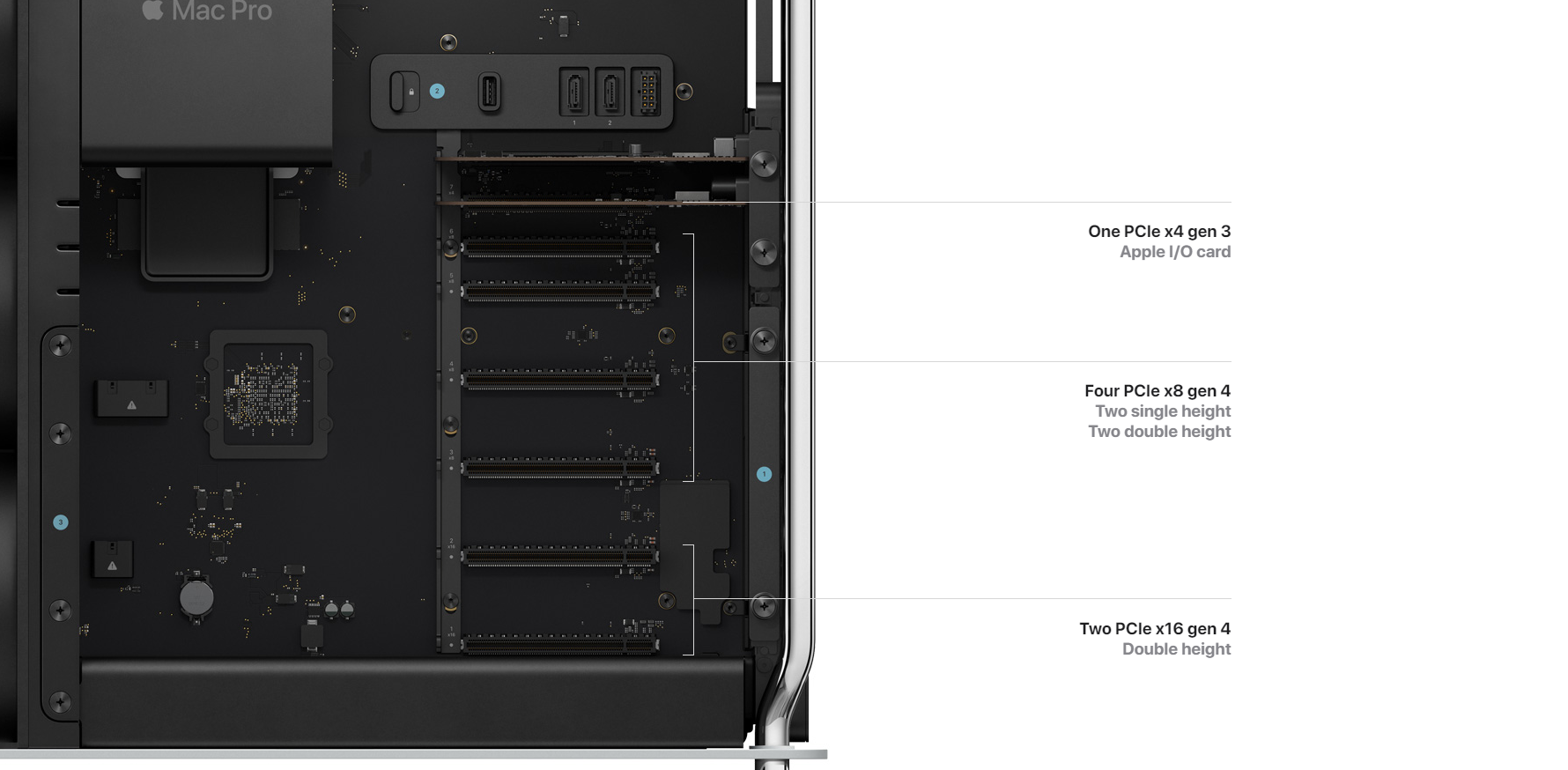
Six full-length PCI Express Gen 4 slots
Two x16 slots
Four x8 slots
One half-length x4 PCI Express Gen 3 slot with Apple I/O card installed
300W auxiliary power available:
Two 6-pin connectors delivering 75W of power each
One 8-pin connector delivering 150W of power
Connections
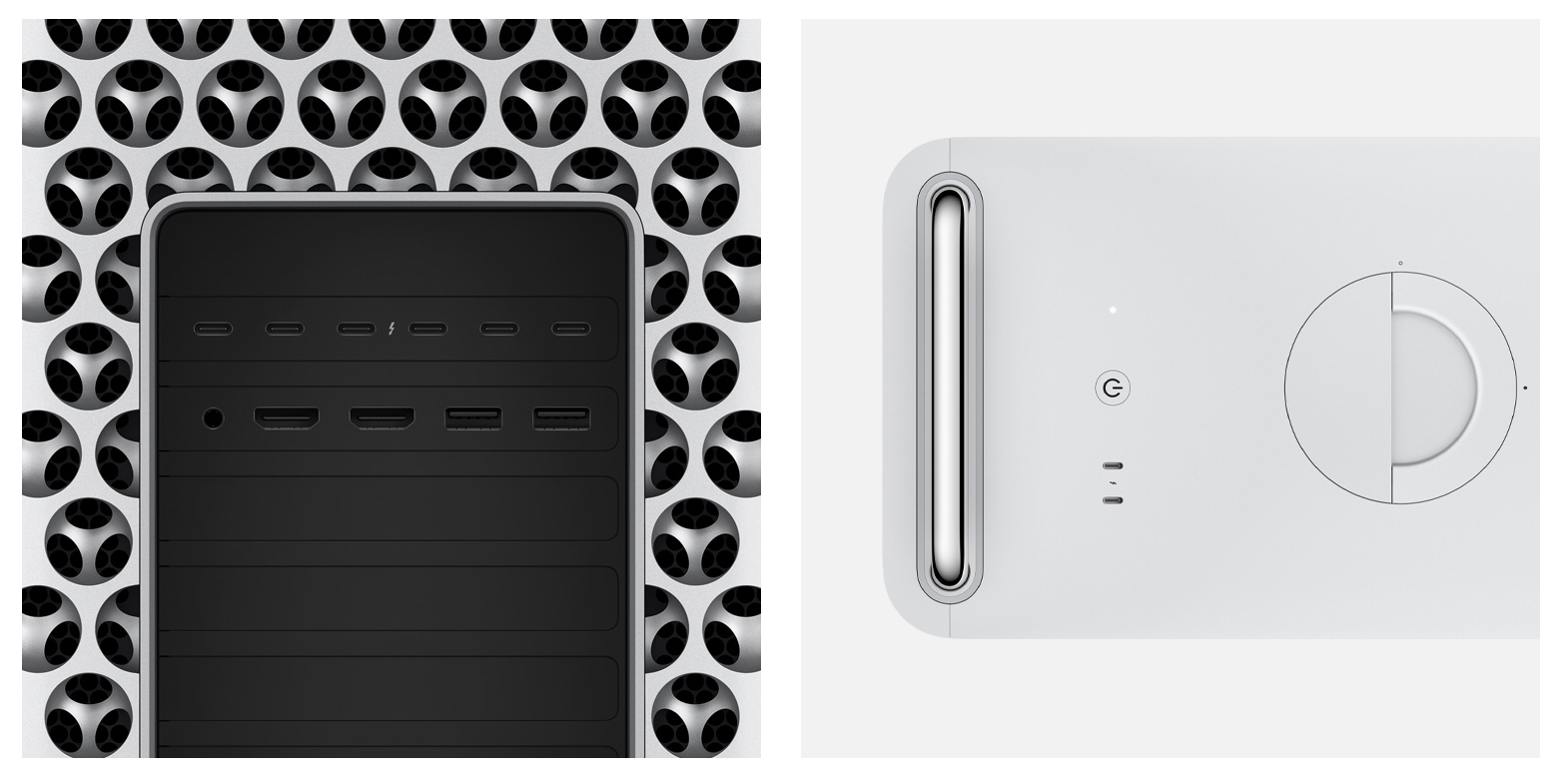
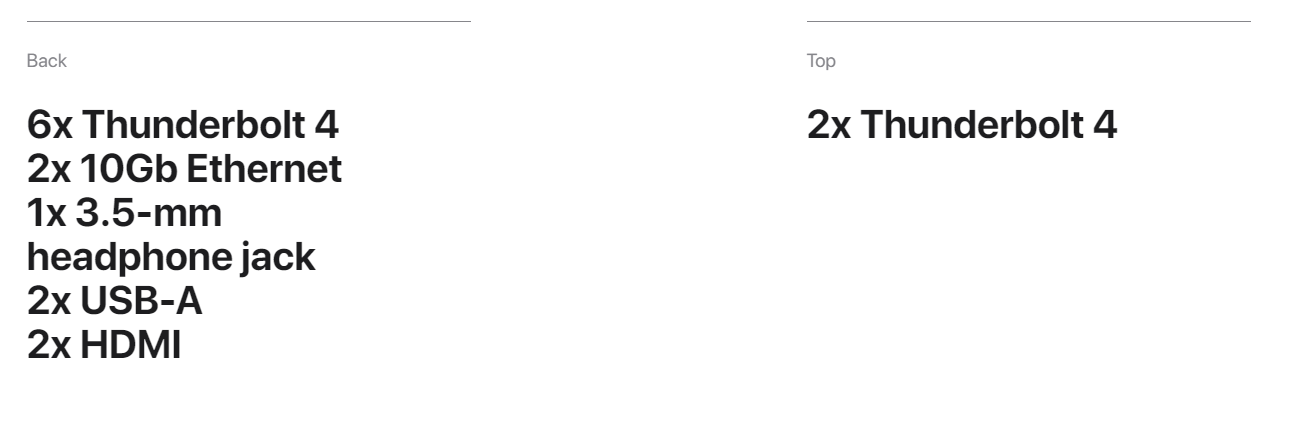
Eight Thunderbolt 4 (USB-C) ports
Six ports on the back of the enclosure and two ports on the top of the tower enclosure or two ports on the front of the rack enclosure
Support for:
Thunderbolt 4 (up to 40 Gbps)
DisplayPort
USB 4 (up to 40 Gbps)
USB 3.1 Gen 2 (up to 10 Gbps)
Internal connections
One USB-A port (up to 5 Gbps)
Two Serial ATA ports (up to 6 Gbps)
Additional connections
Two USB-A ports (up to 5 Gbps)
Two HDMI ports
Two 10Gb Ethernet ports
3.5-mm headphone jack
Communications
Wi-Fi
Wi-Fi 6E (802.11ax)
Bluetooth®
Bluetooth 5.3
Two 10Gb Ethernet ports
10Gb Ethernet (NbaseT Ethernet with support for 1Gb, 2.5Gb, 5Gb and 10Gb Ethernet using RJ-45 connector)
Input Devices
Included
Magic Keyboard with Touch ID and Numeric Keypad
Magic Mouse
Enclosure
Tower
Mac Pro tower enclosure with feet; configurable to tower with wheels
Size and Weight
Height:
52.9 cm (20.8 inches)
Height with optional wheels:
55.7 cm (21.9 inches)
Width:
21.8 cm (8.58 inches)
Depth:
45.0 cm (17.7 inches)
Weight:
16.86 kg (37.2 pounds)
Electrical and Operating Requirements
Line voltage:
100-125V AC at 12A; 220-240V AC at 6A
Frequency:
50Hz to 60Hz, single phase
Maximum continuous power:
1280W at 108-125V or 220-240V; 1180W at 100-107V
Operating temperature:
10° to 35° C (50° to 95° F)
Storage temperature:
-40° to 47° C (-40° to 116° F)
Relative humidity:
5% to 95% noncondensing
Maximum altitude:
Tested up to 5,000 metres (16,400 feet)
Typical acoustical performance:
Sound pressure level (operator position): 5 dBA at idle
In the Box
Tower
Mac Pro
Magic Keyboard with Touch ID and Numeric Keypad
Magic Mouse
USB-C to Lightning Cable (1 m)
Power cord (2 m)
Operating System
macOS
macOS is the most advanced desktop operating system in the world. macOS Ventura makes the things you do most on Mac even better, so you can work smarter, play harder and go further.
Accessibility
Accessibility
Accessibility features help people with disabilities get the most out of their new Mac Pro. With built-in support for vision, hearing, mobility and learning, you can create and do amazing things.
Include:
Voice Control
VoiceOver
Zoom
Increase Contrast
Reduce Motion
Siri and Dictation
Switch Control
Live Captions

