


ASUS TUF GAMING X870-PRO WIFI7 W NEO ATX Motherboard For AMD Ryzen 7000/8000/9000 Series CPUs Socket AM5 -AMD X870E Chipset - PCIe 5.0 - 4x M.2 -3x Internal USB 2.0 Header - 1x Internal USB 3.0 Header - 1x Interna Type C Header, WIFI7 + BT
ASUS TUF GAMING X870-PRO WIFI7 W NEO ATX Motherboard For AMD Ryzen 7000/8000/9000 Series CPUs Socket AM5 -AMD X870E Chipset - PCIe 5.0 - 4x M.2 -3x Internal USB 2.0 Header - 1x Internal USB 3.0 Header - 1x Interna Type C Header, WIFI7 + BT
- Brand: ASUS
- MPN: TUF GAMING X870-PRO WIFI7 W NEO
- Part #: MBDASU28716
- UPC: 199291425255
Select your store to check availability


- Brand: ASUS
- MPN: TUF GAMING X870-PRO WIFI7 W NEO
- Part #: MBDASU28716
- UPC: 199291425255
COMBO DEALS: Buy Together and SAVE!


AMD Ryzen 7 9800X3D CPU 8 Core / 16 Thread - 104MB Total Cache - AM5 Socket - 120W TDP - AMD Radeon...
$766.36 +GST
$881.31
Kingston NV3 1TB M.2 NVMe Internal SSD PCIe Gen 4 - Up to 6000MB/s Read - Up to 4000MB/s Write -...
$266.66 +GST
$306.66
Crucial 16GB DDR5 for AMD EXPO / Intel XMP Desktop UDIMM RAM - 5600Mhz - CL46
$286.06 +GST
$328.97
Cooler Master MasterLiquid Core Nex Digital 360 ARGB Black 360mm AiO Water Cooling Support Intel LGA...
$129.72 +GST
$149.18
Features
TUF GAMING X870-PRO WIFI7 W NEO
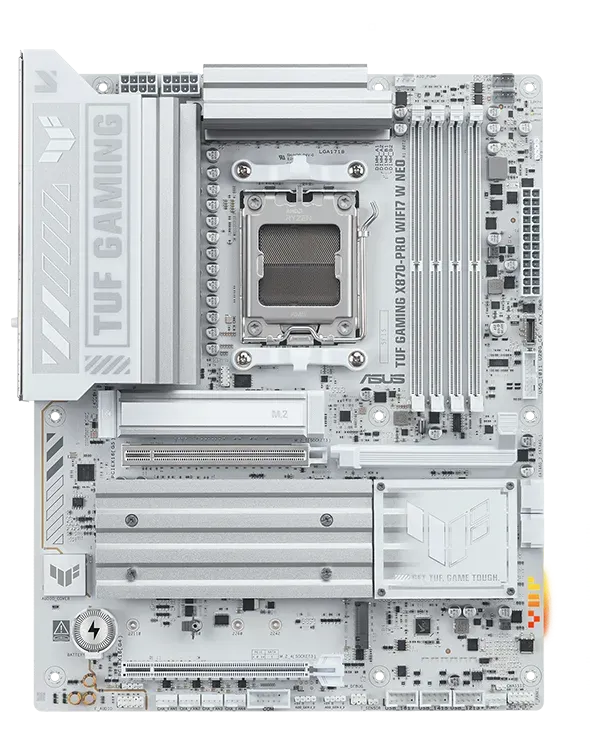
ASUS TUF GAMING X870-PRO WIFI7 W NEO takes all the essential elements of the latest AMD Ryzen™ processors and combines them with game-ready features and proven durability. Engineered with an upgraded power solution and a comprehensive cooling system, this motherboard goes beyond expectations with rock-solid and stable performance for marathon gaming. TUF GAMING motherboards also undergo rigorous endurance testing to ensure that they can handle conditions where others may fail. This platform delivers the power and connectivity that advanced AI PC applications demand.
Performance
Cooling
Gaming Immersion
Connectivity
Intelligent - Complete AI Solution
ASUS AI Solutions - including AI Cache Boost, AI Advisor, AI Overclocking, AI Cooling II for thermal control and AI Networking II for real-time bandwidth optimization - offer smart assistance, one click overclocking, efficient cooling and new levels of ultrafast connectivity.
AI CACHE BOOST
Supercharge your large language model (LLM) workflows with AI Cache Boost. Exclusive to ASUS AMD 800 and 600 series motherboards that use Ryzen™ 9000 Series CPUs, this BIOS setting optimizes CPU cache and memory pathways to deliver up to 29% faster local LLM performance with high-speed memory tuning.

AI Advisor
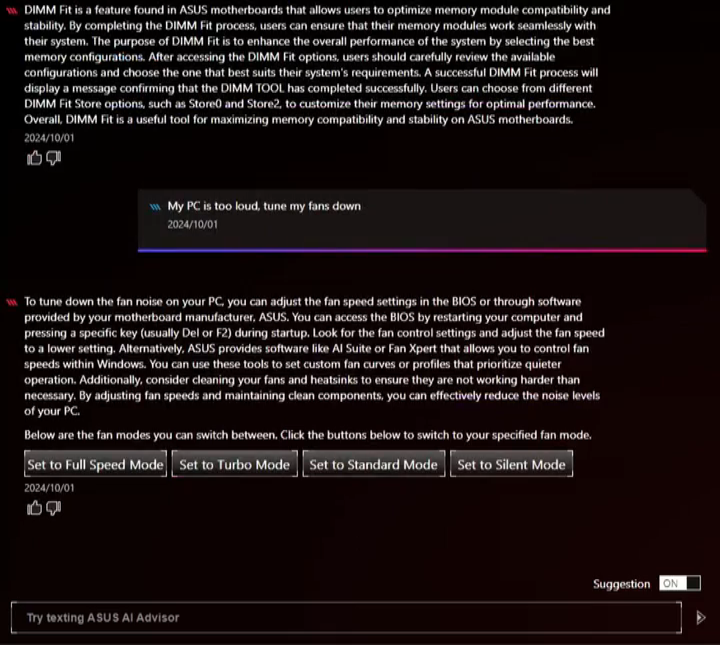
ASUS AI Advisor is an ASUS technical expert that's always available to answer your questions. Owners of compatible ASUS motherboards can interact with this AI-powered technology using natural language to learn more about their hardware. For DIY beginners, it can provide easy-to-understand explanations of one-click optimization features like AI Overclocking and AI Cooling II, and for seasoned PC-building veterans, it can offer guidance and instructions on the latest features offered by ASUS.
* Availability of ASUS AI Advisor may vary by region.
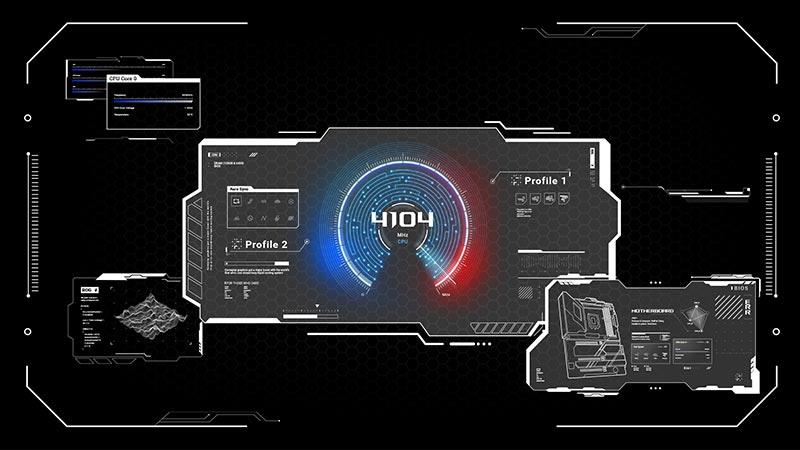
AI Overclocking
Maximized CPU performance, and predictions for ideal CPU and cooling settings, pushing your system to its limits.
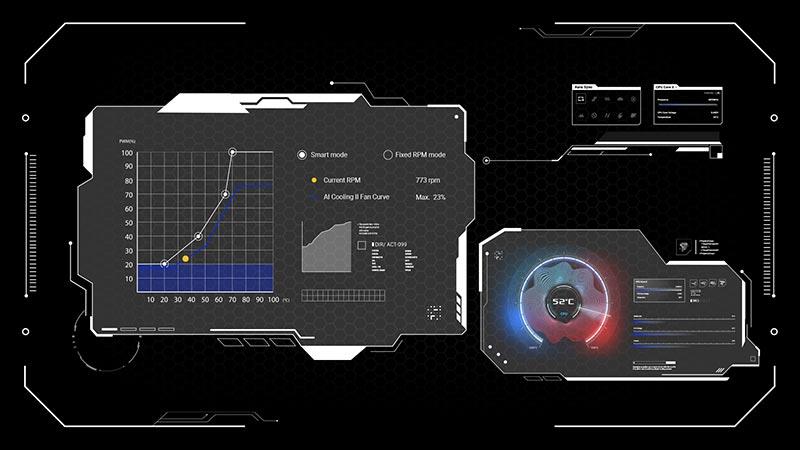
AI Cooling II
Optimized thermals, and reduced noise via dynamic adjustment of fan speeds, based on CPU temperatures.
AI Networking II
Optimized network performance, helping to ensure seamless connectivity and maximized WiFi 7 speeds.
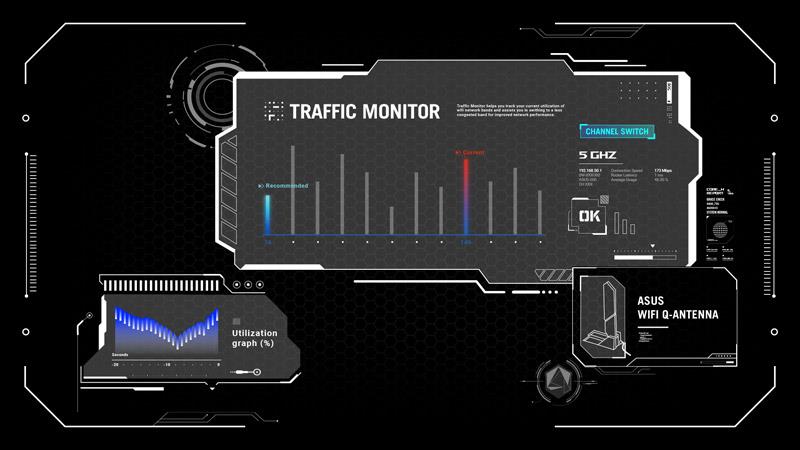
Intelligent Overclocking
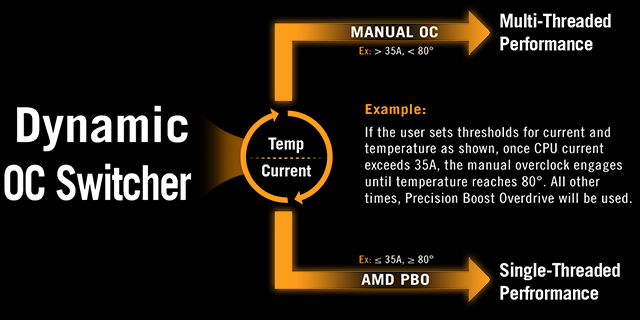
DYNAMIC OC SWITCHER
Dynamic OC Switcher maximizes CPU performance by letting you set current and temperature thresholds to automatically switch between a manual overlock for heavy multithreaded workloads and Precision Boost Overdrive for single-threaded tasks. The latest Overclocking Load Guard has an enhanced instantaneous current protection mechanism to prevent users from experiencing system crashes during overclocking.
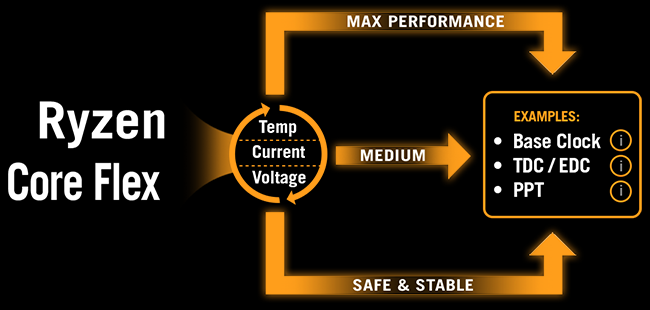
CORE FLEX
Core Flex empowers you to smash limits farther than ever before by letting you control power and thermals in creative new ways. In its simplest form, you can set breakpoints to gradually reduce CPU core frequency as temperature or current increases. But the system is extremely adaptable, supporting multiple user-controlled functions that can manipulate power, current and temperature limits independently so that you can bend CPU performance to your will.
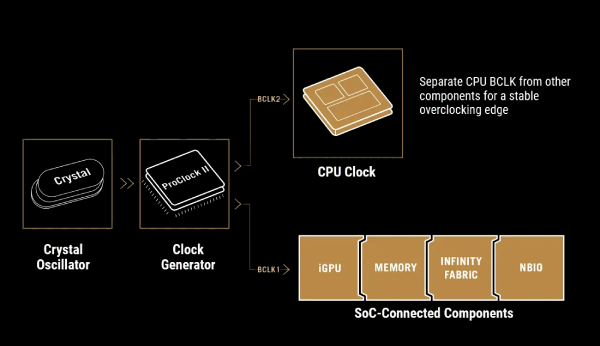
Asynchronous Clock
For next-level frequency flexibility, the TUF GAMING X870-PRO WIFI7 W NEO features a built-in clock generator that isolates CPU base clock from memory, PCIe, and the Infinity Fabric speed. Drive CPU performance to its absolute brink while maintaining the stability of related clock domains. Separate CPU BCLK from other domains for unfettered overclocking.
UEFI BIOS
The UEFI interface delivers easy-to-use configuration options for PC beginners, and advanced features for veterans.
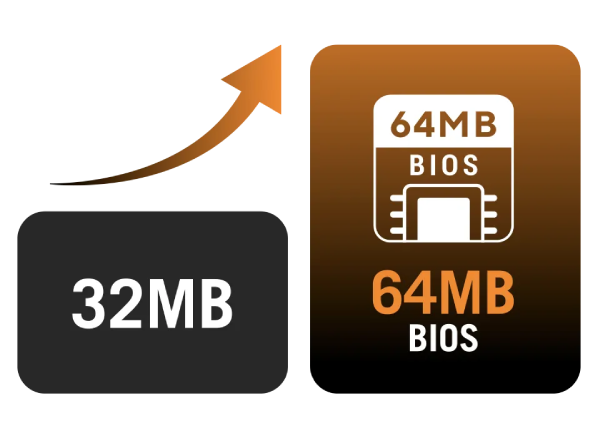
64MB BIOS
A larger BIOS chip enables a more powerful interface and extended CPU compatibility with the latest and future AM5 processors, ensuring a smooth, seamless user experience.
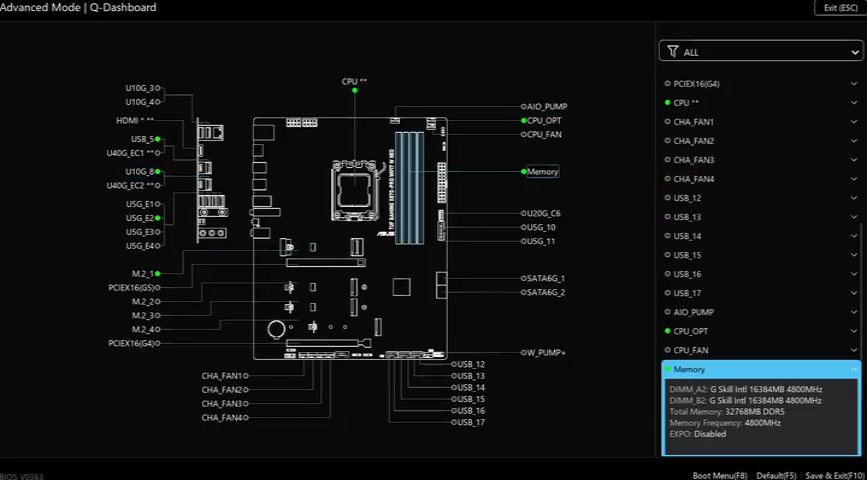
BIOS Q-Dashboard
Simplify your motherboard configuration with BIOS Q-Dashboard. Its intuitive visual representation of hardware connections and corresponding BIOS settings takes the complexity out of setting up your system. Upgrade now, and discover the power of BIOS Q-Dashboard to easily and efficiently enhance your computing setup.
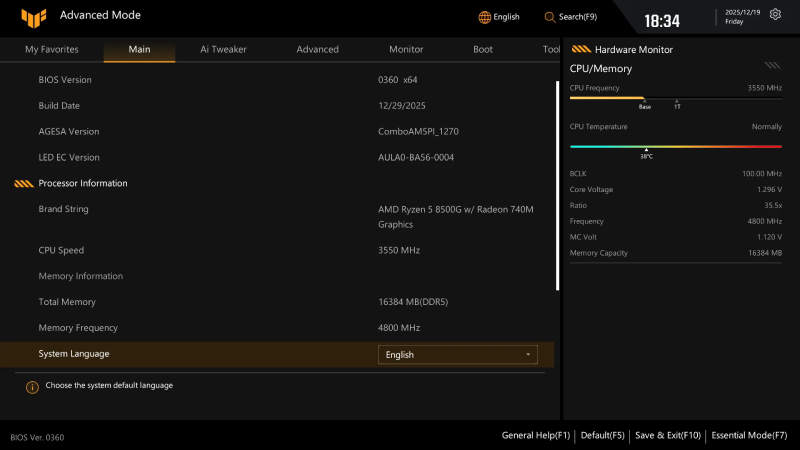
Advanced Tuning for Serious Tweakers
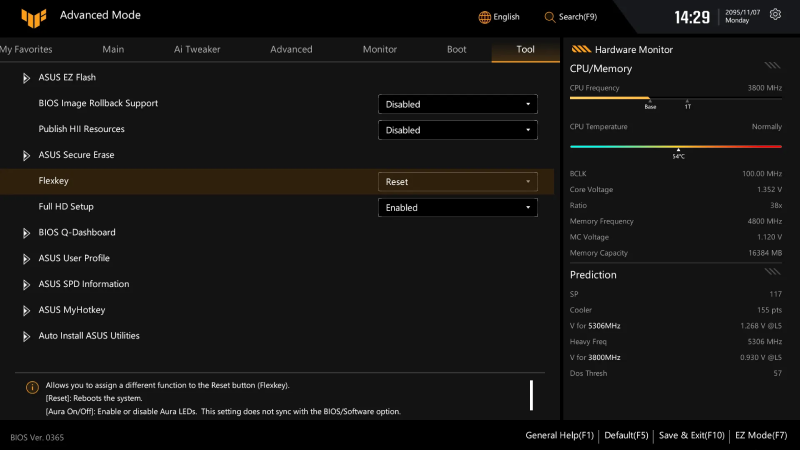
An intuitive Advanced mode offered via the UEFI lets you take complete control. A built-in search feature makes it easy to find options, and various advanced functions let you intelligently make nuanced adjustments so you can dial in performance just the way you want.
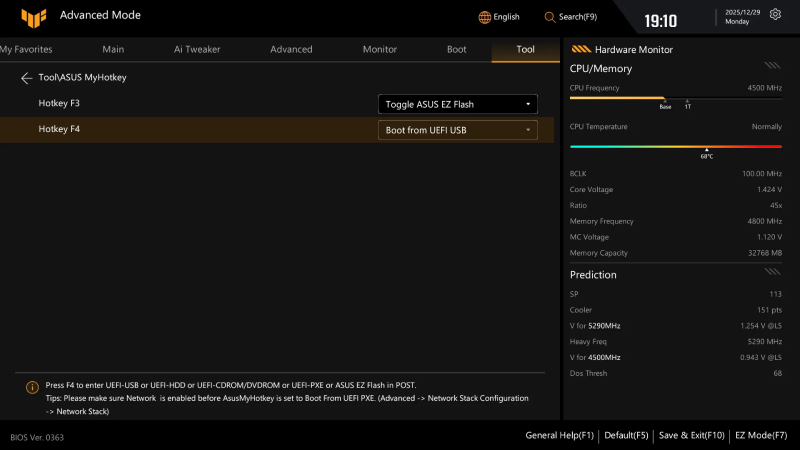
ASUS MyHotkey
This feature provides a fast, convenient way to update the BIOS and boot your OS, enhancing PC upgrades with streamlined efficiency for DIY users.
FlexKey
Remap the reset button on the chassis to toggle Aura lighting, activate the DirectKey to go straight to the UEFl BIOS, or reset the system.
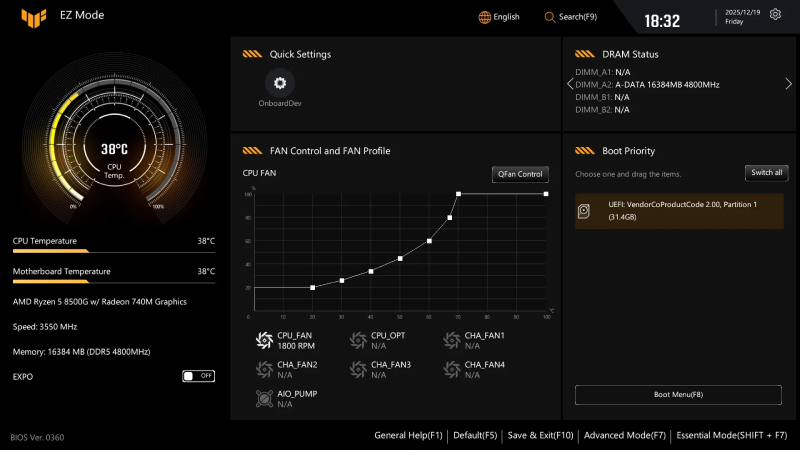
Quick and Simple Setup
EZ Mode displays vital settings and stats and also offers guided wizards, drag-and-drop functionality and one-click application of important settings - all to help you get your rig up and running in no time.
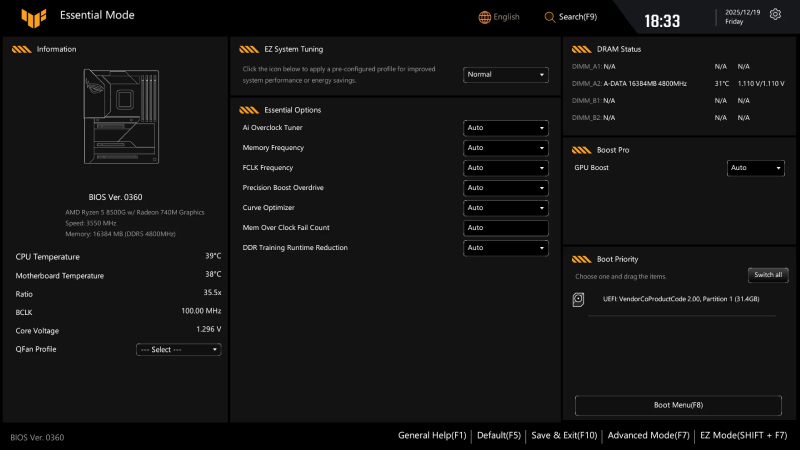
Essential OC Control, Simplified
Essential Mode provides quick access to commonly used overclocking settings and key system information, making performance tuning easy without diving into menus that require deeper expertise.
EZ System Tuning
Quickly apply pre-configured profiles for improved system performance or energy savings.
Boost Pro
Enhance system performance by optimizing GPU Boost, AI Cache Boost, and Turbo Game Mode for different usage scenarios.
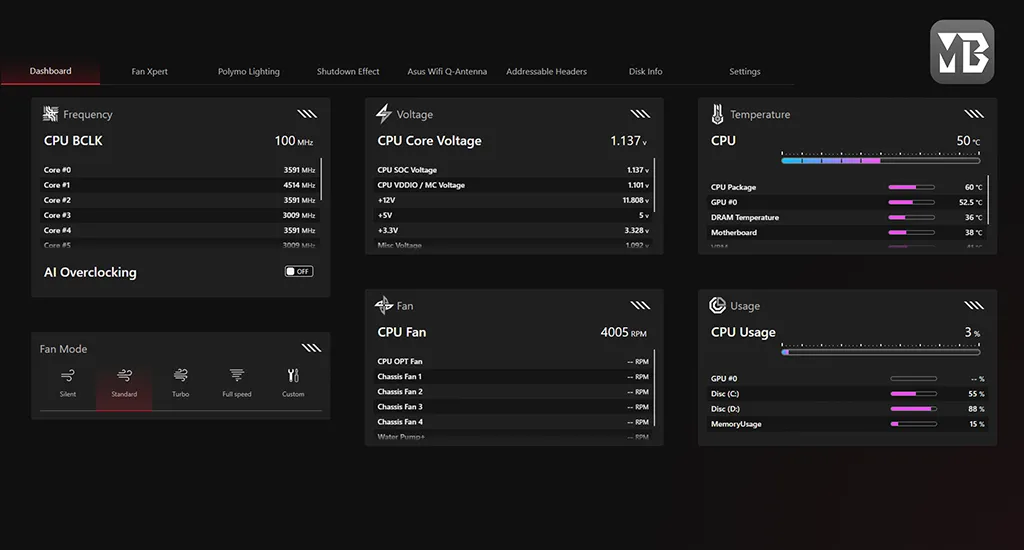
ASUS MB Manager
ASUS MB Manager delivers fast, fluid, and intuitive control over essential features, offering a smooth experience for monitoring system stats, customizing onboard RGB lighting*, accessing fan cooling controls, and fine-tuning advanced WiFi settings. It also works seamlessly with Armoury Crate to provide an even more comprehensive system management experience.
* ASUS MB Manager controls motherboard RGB lighting only. For cross-product Aura Sync, please use Armoury Crate.
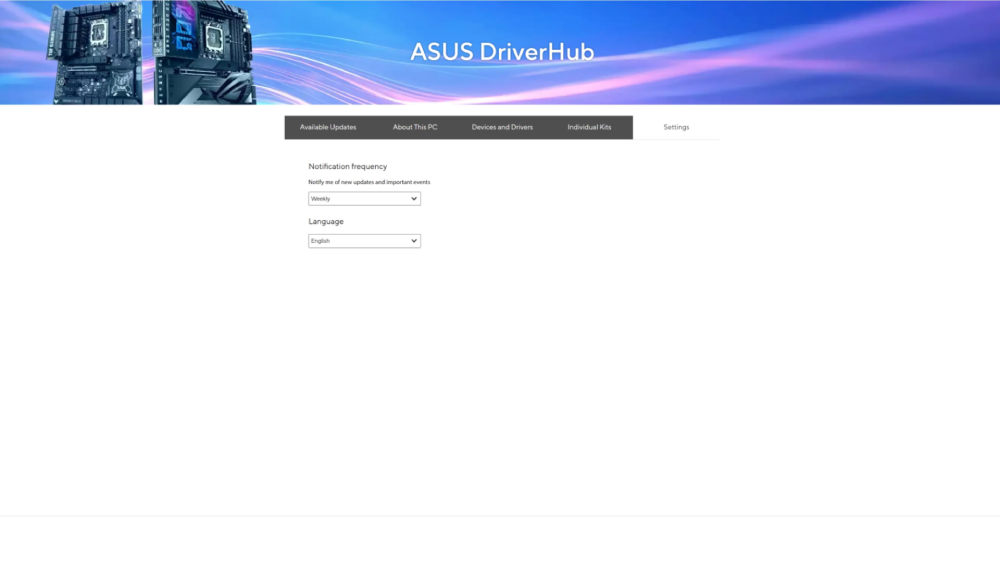
ASUS DriverHub
ASUS DriverHub streamlines the installation and management of ASUS drivers and utilities to keep your hardware up-to-date and performing optimally. This standalone application automatically detects current driver versions and presents available updates in a list view. By default, it supports ASUS motherboards, and users are invited to install ASUS DriverHub after OS installation. Additionally, ASUS DriverHub offers one-click installation and update checks, making it easier for users to keep their systems running smoothly and efficiently.
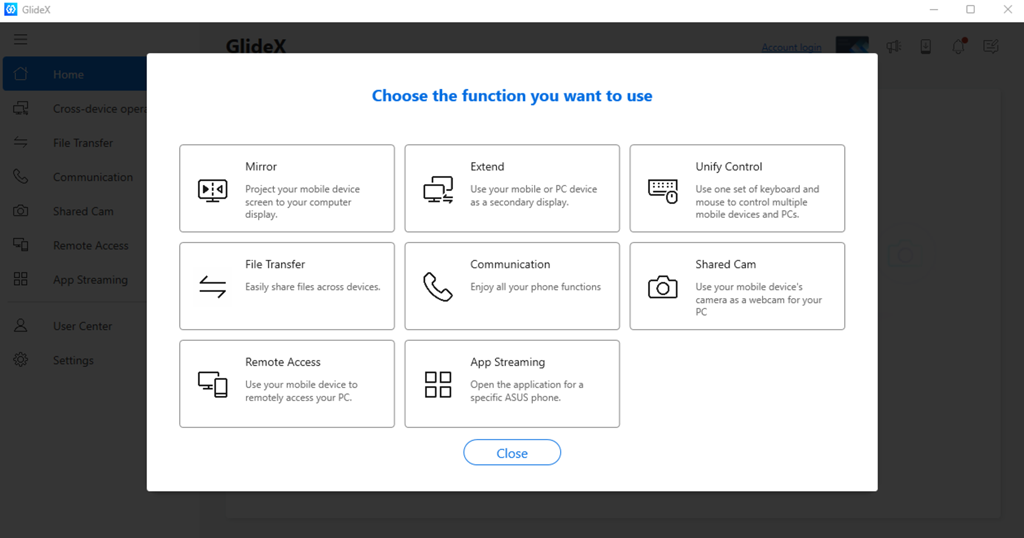
ASUS GlideX
ASUS GlideX is a cross-device, cross-platform screen-sharing, screen-control and operation solution for enhanced productivity across PCs, tablets and smartphones via USB or WiFi. Features include screen mirroring, screen extension, unified control with one keyboard and mouse, easy file transfers, and using mobile cameras as PC webcams. It is compatible with Windows, macOS, Android and iOS.
Performance - Premium Power Design
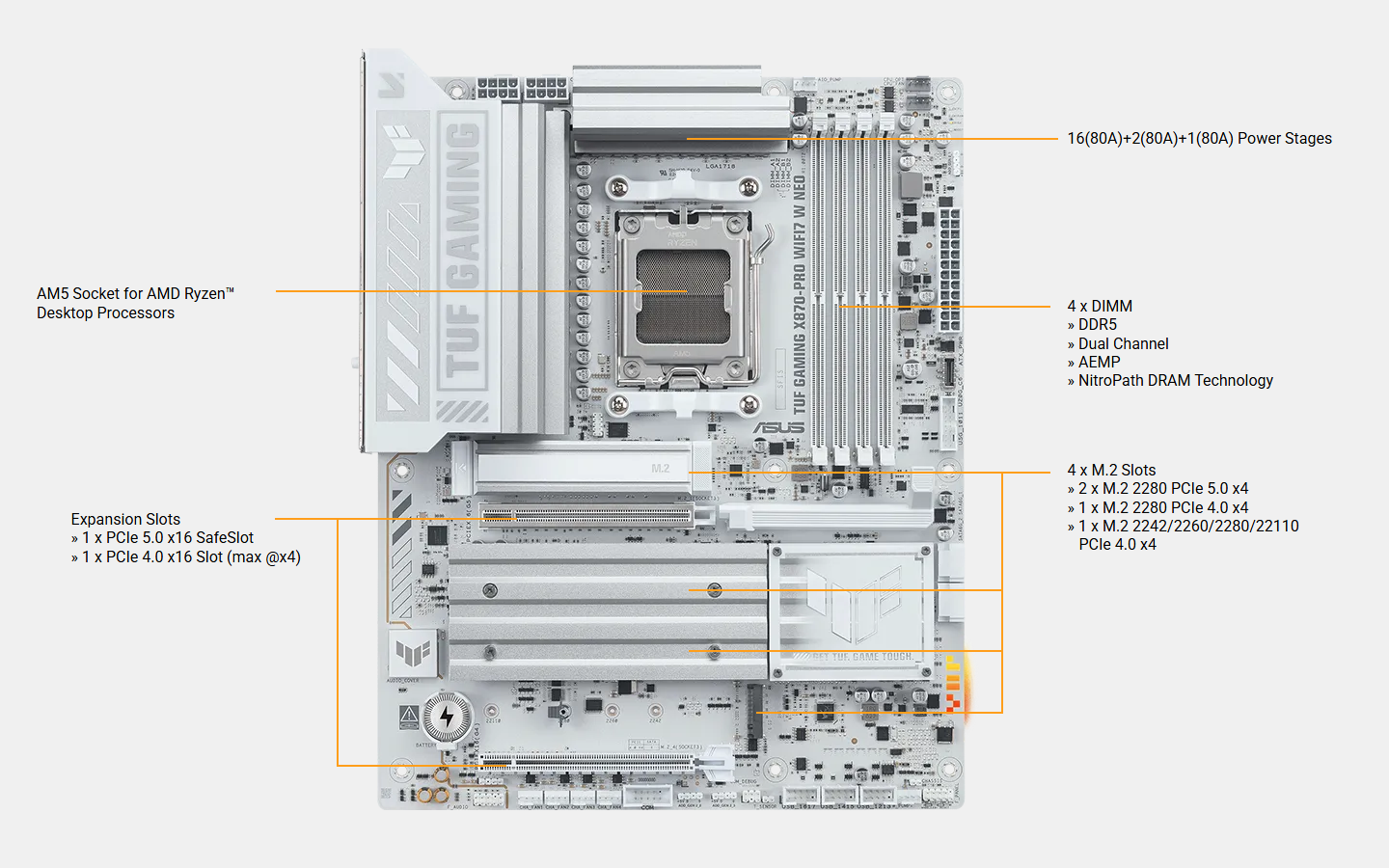
Stable power is crucial for maximizing the performance of AMD processors. The motherboard is designed to meet the needs of high-core-count CPUs. It features 16(80A) + 2(80A) + 1(80A) power stages that integrate high-side and low-side MOSFETs and drivers into packages rated for up to 80A each. This configuration ensures optimal power delivery, efficiency, stability and performance for both current and future AMD processors.
- 16 Vcore Power (80A, SPS)
- 2 SOC Power (80A, SPS)
- 1 Misc Power (80A, DrMOS)
Eight-Layer Server-Grade Design
Built on an eight-layer server-grade stack for precise signals and stable performance.
Built on a server-grade eight-layer blueprint, this motherboard's core is engineered for precision. Bus signals for PCIe 5.0 and DDR5 are clean and stable, thanks to controlled impedance and dedicated power/ground layers, while the stiffer structure enhances durability. The result is quieter signal behavior and steadier performance under pressure.
ProCool Power Connectors
Proprietary 8+8 pin connectors improve PSU connection.
Compared to traditional power inputs, ASUS ProCool connectors are built to tight specifications to ensure full contact with PSU power cables. The resulting lower impedance helps prevent hotspots and connector failure.
Digi+VRM Control
Real-time voltage control.
The integrated Digi+ voltage-regulator module (VRM) is one of the finest in the industry, optimized for ultra-smooth and ultra-clean power delivery to the CPU at all times.
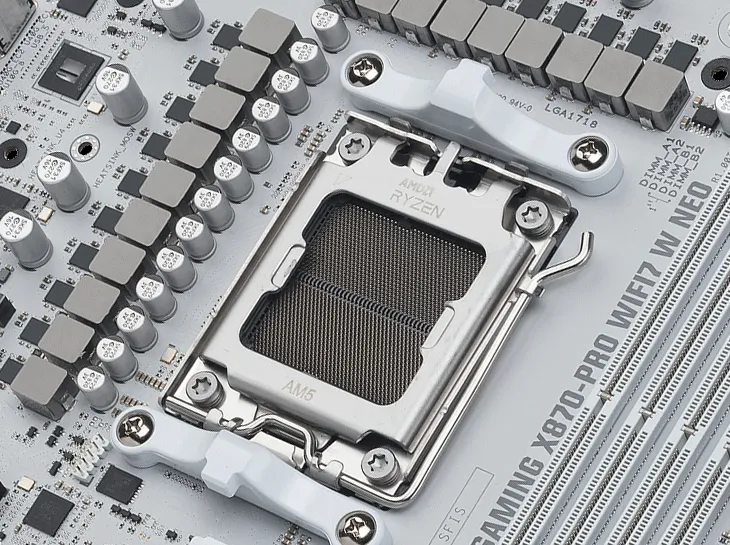
Server-Grade DRAM Enhancement
This motherboard features an enhanced memory slot layout that delivers high clock speeds and compatibility with high-capacity DDR5 kits. The refined design supports overclocking of up to 9,600+ MT/s, helping you unlock the full potential of your DDR5 modules-whether you're pushing extreme-speed kits or maximizing entry-level sets*.
* Achievable with advanced BIOS configuration and potentially specialized hardware. Results may vary according to system components.
- Up to DDR5 9600+ MT/s (OC)
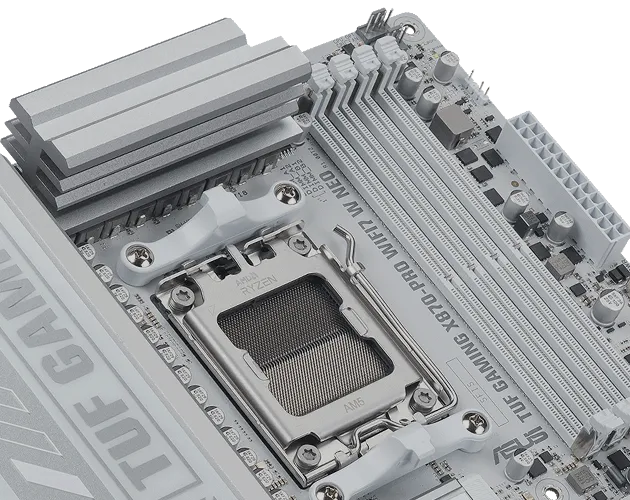
DDR5 Dominance
For users looking to push well beyond stock DDR5 speeds, this motherboard is engineered for enthusiast-grade performance with broad AMD Extended Profiles for Overclocking (EXPO™) support and an upgraded memory design tuned for stability at ultra-high frequencies. Veterans can further tweak performance via an extensive array of settings in the UEFI.
ASUS AEMP
ASUS Enhanced Memory Profile (AEMP) is an exclusive firmware feature for PMIC-restricted memory modules. AEMP automatically detects the memory chips on your kit and then presents optimized frequency, timing and voltage profiles that you can quickly apply.
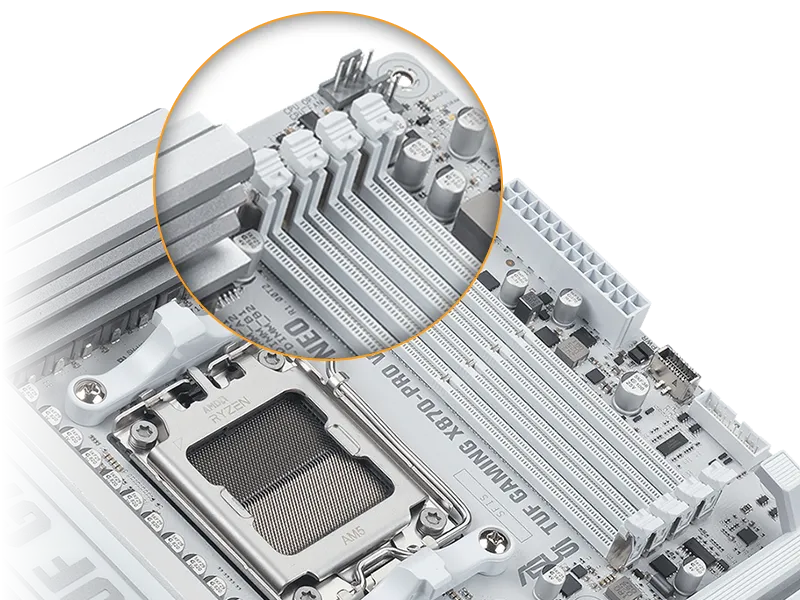
NitroPath DRAM Technology
Frequency up to 400 MT/s higher
Slot retention force enhanced by 57%
DIMM Fit / DIMM Fit Pro
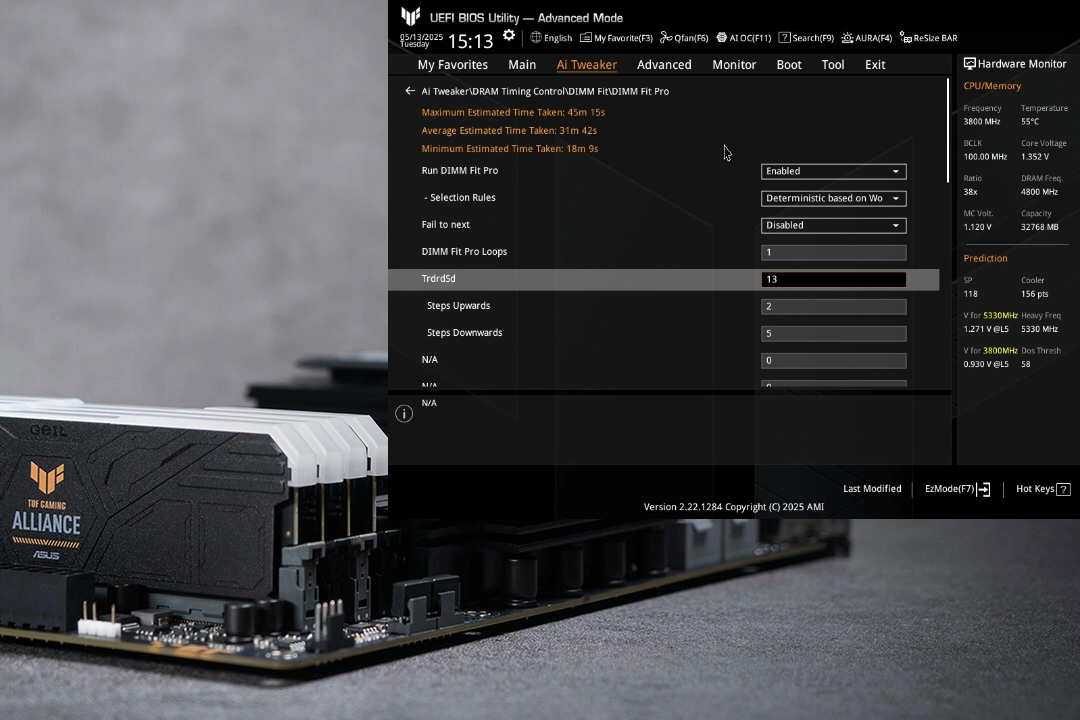
DIMM Fit is an ASUS-exclusive BIOS feature that precisely analyzes individual memory modules to optimize performance and pinpoint potential issues.
DIMM Fit Pro gives advanced PC builders more extensive customizability for memory tuning. It allows users to control up to twenty overclocking parameters, define testing ranges, and prioritize stability or performance, offering a more flexible and granular approach to memory optimization.
Cooling - Cooler by Design
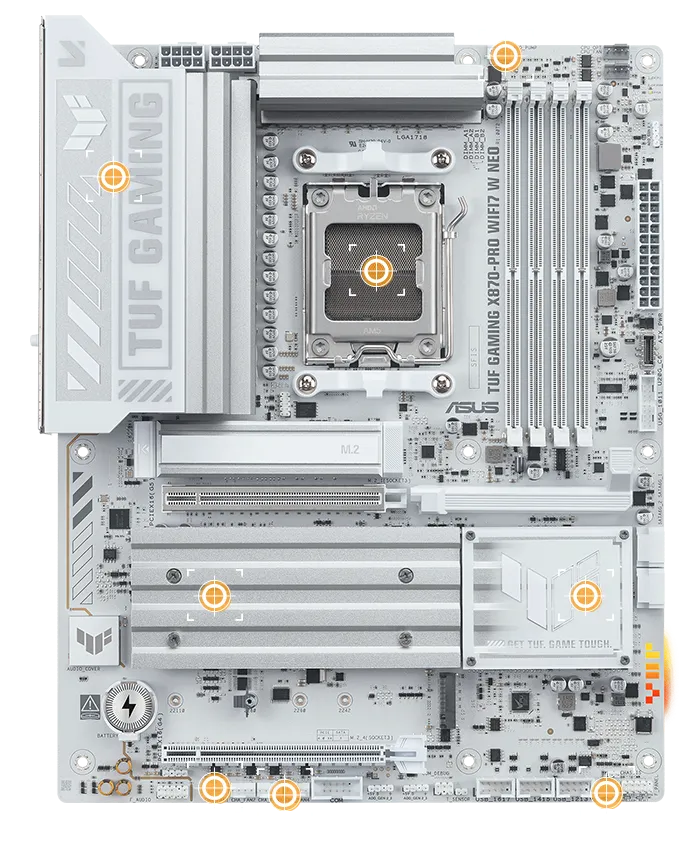
Enlarged VRM Heatsinks
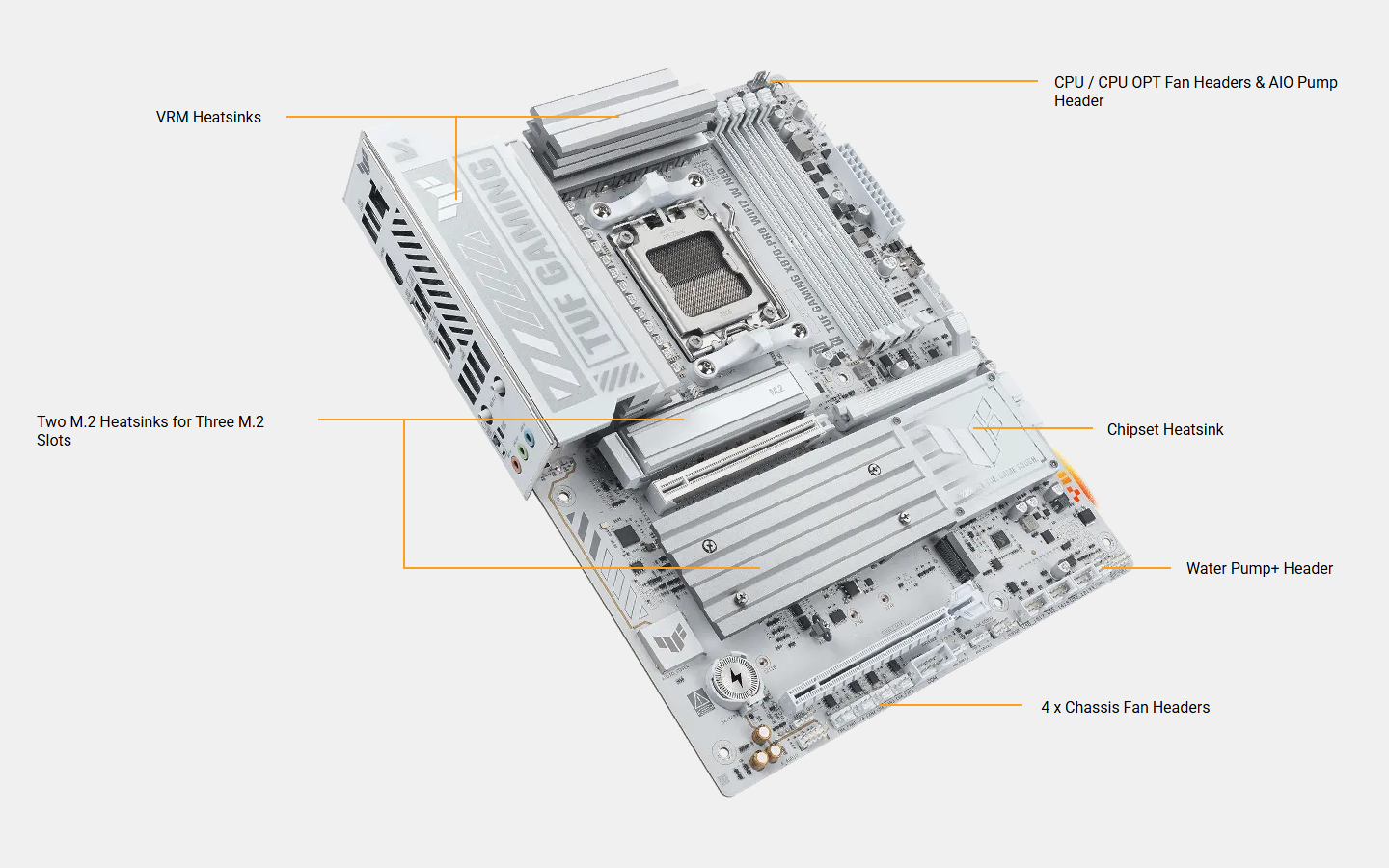
The extensive surface area of this heatsink covers the MOSFETs and chokes to improve thermal performance.
Enlarged M.2 Heatsinks
Three of the four M.2 slots have dedicated heatsinks to help keep M.2 SSDs at optimal operating temperatures and ensure consistent performance and reliability.
Smart Fan Protection
A dedicated integrated circuit protects each fan header from excess heat and electrical currents.
4-Pin PWM/DC Fan
Onboard fan headers support auto-detection of PWM or DC fans.
AIO Pump Header
An integrated AIO management system enables full control of PWM or DC water pumps, making it perfect for custom or all-in-one cooling setups.
Multiple Temperature Sources
Except for the CPU & CPU OPT fan headers, each fan header can be set to monitor and react to up to three user-configurable thermal sensors for workload-based cooling, and all settings can be easily managed through Fan Xpert 4 or via the UEFI.
Fan Xpert 4 allows you to map the temperature of supported ASUS graphics cards to optimize cooling for GPU- and CPU-intensive tasks.
Superb PCH Heatsink
A surface area for the chipset cooler maximizes system performance and heat dissipation.
Water Pump+ Header
A dedicated header supplies 3A for high-performance PWM or DC water pumps.
Cooling - Cooler Compatibility
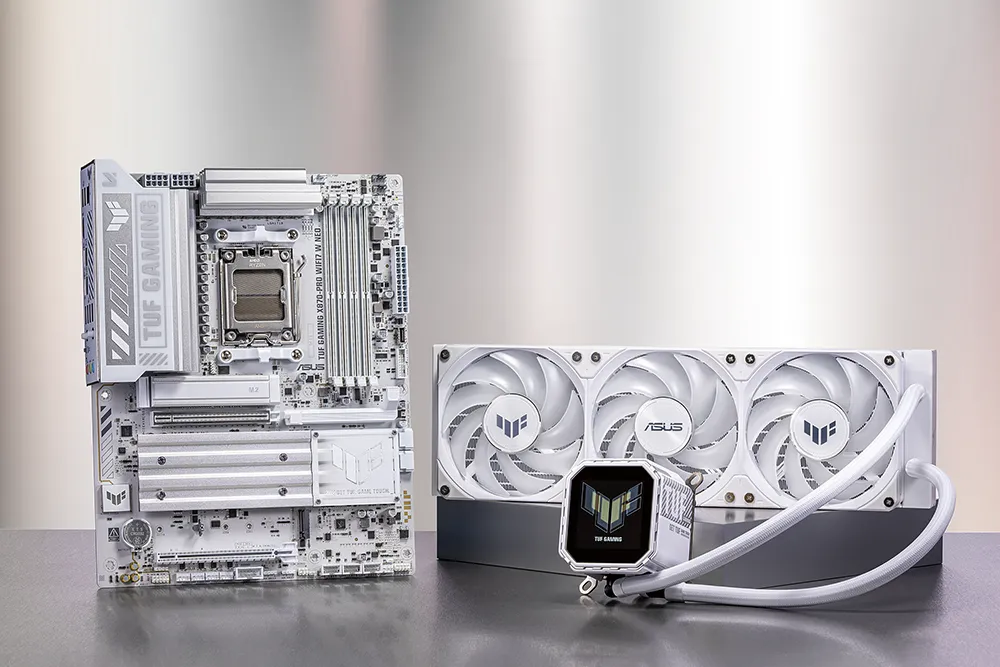
ASUS AIO coolers offer robust performance, high overclocking potential, bold aesthetics and customizable functionality for new TUF Gaming motherboards, empowering you to build your dream gaming rig.
* Image for reference only.
Connectivity - Empowering Connection
This motherboard offers a versatile range of connectivity with PCIe 5.0, USB4® 40Gbps and front USB 20Gbps Type-C® connectors with Fast Charge support.
PCIe Lane Optimization
Fully utilizes native PCIe 5.0 lanes supported by AMD Ryzen™ 9000 & 7000 CPUs, delivering optimal bifurcation and efficient bandwidth across all scenarios*. Enjoy maximized bandwidth of the first PCIe 5.0 x16 slot and two PCIe 5.0 M.2 slots, when the USB4® 40Gbps ports are not in use.
* Scenarios vary by model.
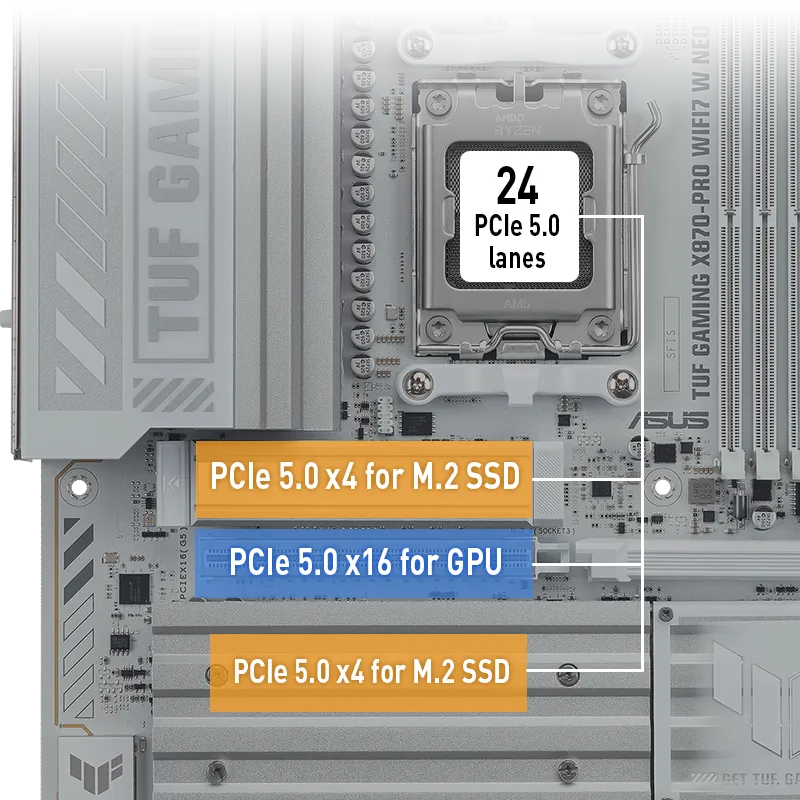
PCIe 5.0 for Graphics Card
PCIe 5.0 offers twice the data transfer speed of PCIe 4.0, making it robust enough to handle new data-heavy tasks. PCIe 5.0 also brings other benefits, such as electrical changes to improve signal integrity, backward-compatible CEM connectors for add-in cards and backward compatibility with previous versions of the PCIe bus.
USB4® 40Gbps Type-C® Port
Each port delivers up to 40Gbps of bi-directional bandwidth for the latest super-speed devices and drives. Both ports can be employed for up to two external 4K displays.
Front USB 20Gbps Type-C®
This motherboard features a USB 20Gbps Type-C® front panel connector for speedy data transfers of up to 20Gbps. And it offers Power Delivery (PD) 3.0 technology to provide up to 30W of quick charging.
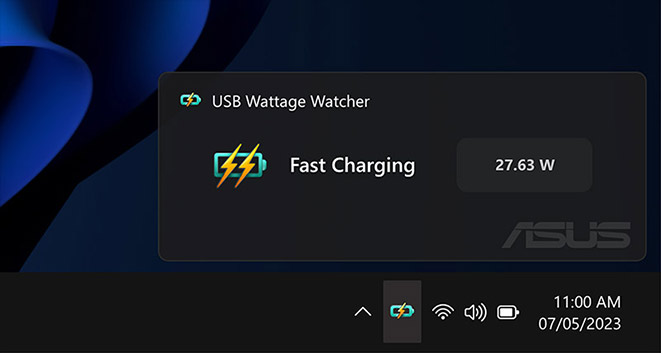
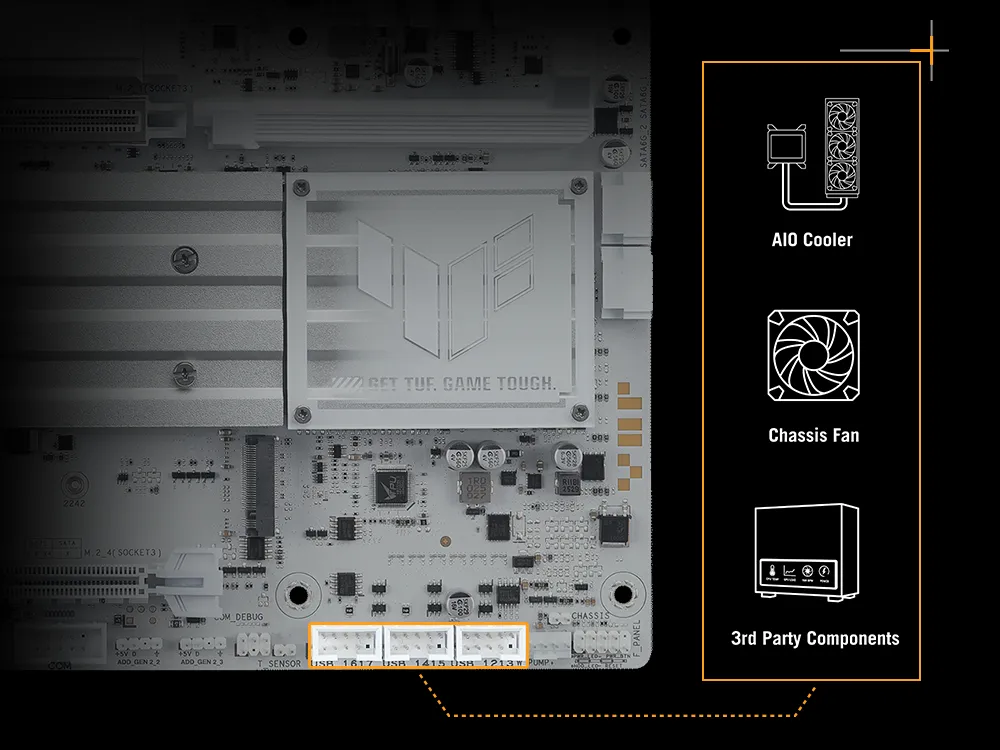
Three USB 2.0 Headers
Three USB 2.0 headers ensure broad compatibility with AIO coolers, chassis fan hubs, front USB modules, and popular third-party components.
Easy PC DIY
PCIe Slot Q-Release
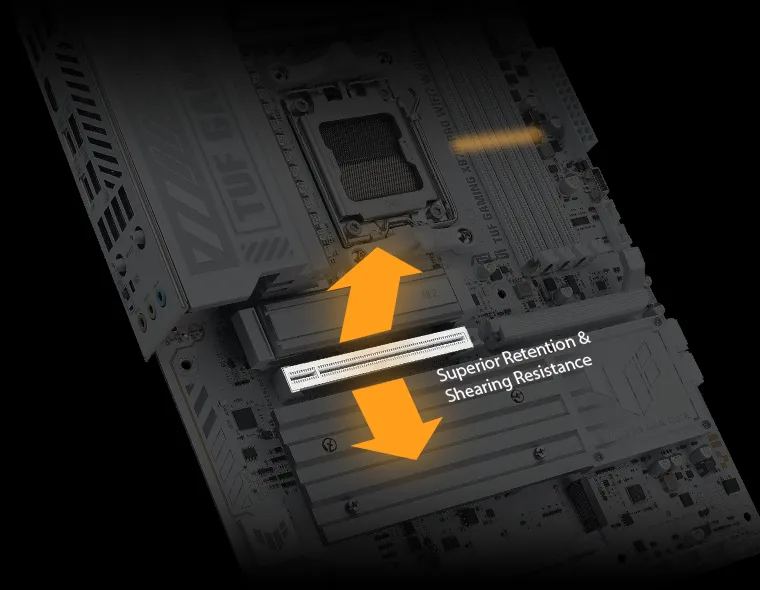
A physical lever unlocks the first PCIe slot's security latch with one tap, greatly simplifying the process of detaching a PCIe card from the motherboard when it's time to upgrade to a new GPU or other compatible device.
M.2 Q-Release
The M.2 heatsink features a convenient switch* to quickly remove it, eliminating the need for tiny screws during SSD installation. Its strong locking mechanism also provides a snug contact surface, helping to ensure reliable heat dissipation for your SSD.
*Switch may be a lever or button, depending on motherboard model.
Q-Antenna
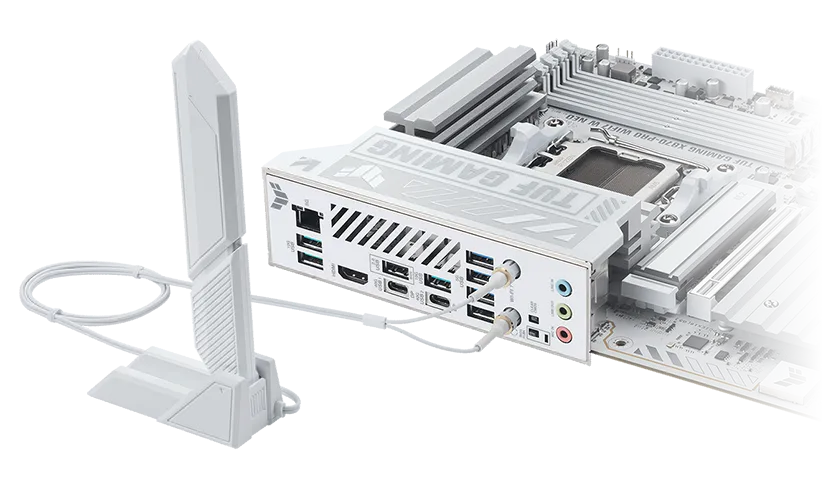
With Q-Antenna, attaching a WiFi antenna to your PC is now easy and fast. Instead of slowly rotating two fasteners until they finally lock in, they just snap into place. Less hassle, and more consistent performance.
M.2 Q-Latch
The innovative ASUS Q-Latch makes it easy to install or remove an M.2 SSD without the need for specific tools or screws. This design employs a simple locking mechanism to secure the drive and neatly detach it with one tap.
Q-LED
The on-board Q-LED troubleshooting lights give PC builders a quick indicator to confirm that key components ― CPU, RAM, graphics card, storage devices ― are functioning normally during startup.
Clear CMOS & BIOS FlashBack™
The Clear CMOS button quickly resets BIOS settings to factory default. lt can also be used to reboot the PC if incorrect BIOS settings have been selected.
BIOS FlashBack™ is a safe and simple way to update BIOS. Just drop the (UEFI) BIOS file onto a FAT32-formatted USB stick, plug it into the USB BIOS FlashBack port, and press the button. Updates can even be performed without having memory or a CPU installed.
DIY Protection
SafeSlot & SafeDIMM
SafeSlot is a reinforced metal sheath integrated with a PCIe slot to keep a card firmly installed and to ensure the highest possible data speeds. The SafeDIMM sheath is integrated to protect memory modules, empowering you to insert them with speed, accuracy and confidence.
ESD Guards
ASUS added special TVS diodes to boost electrostatic discharge prevention by up to +/- 10 kV of air discharge and +/- 6 kV of contact discharge - well above the industry standard.
TUF LANGuard
TUF LANGuard is a military-grade innovation that integrates advanced signal-coupling technology and premium surface-mounted capacitors to improve throughput, helping to protect the motherboard from lightning strikes and static electricity.
Stainless Steel Back I/O Panel
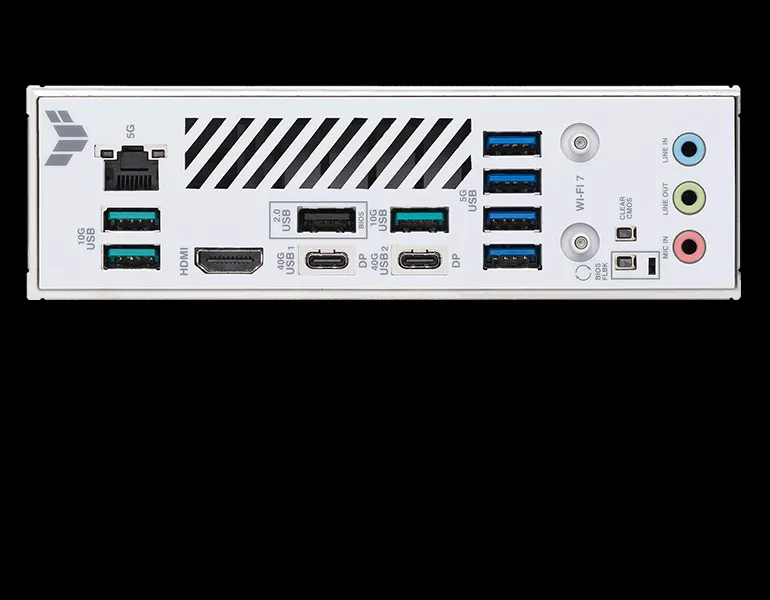
TUF Gaming motherboards feature a corrosion-resistant stainless steel rear I/O panel with up to a 3X longer lifespan. These models pass a rigorous 72-hour salt fog test, surpassing the industry standard.
DIY - Build With Confidence
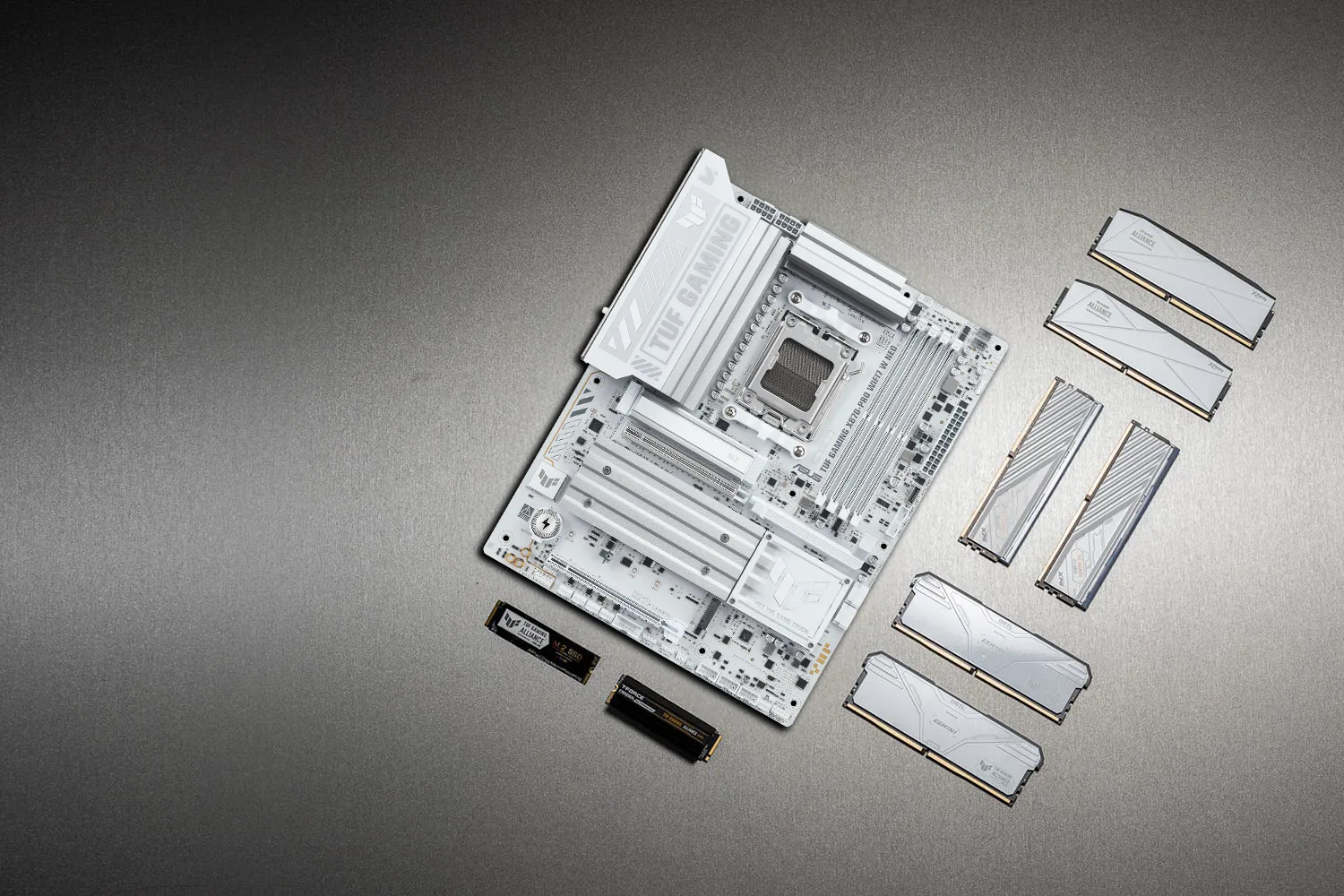
TUF GAMING Alliance is a collaboration between ASUS and trusted PC component brands to ensure compatibility across a wide range of parts, such as PC cases, power supplies, CPU coolers, memory kits and more. With new partnerships and components being added regularly, the TUF GAMING Alliance will continue to grow even stronger.
Gaming - Ultrafast Networking
Provide a feature-packed high-performance gaming package, with ultrafast networking for smoother online gameplay.
WiFi 7
The next-gen WiFi 7* supports 160 MHz bandwidth in the 6 GHz band and 4096 QAM. Multi-Link Operation (MLO) ensures stable connections and low latency, supporting 2.4, 5, and 6 GHz bands for enhanced coverage and throughput.
* WiFi 7 features require an onboard WiFi chipset, WiFi AP, and WiFi 7-supported operating systems to support the corresponding features. The 6 GHz band may be unavailable in some regions/countries due to regulatory restrictions. Please visit the ASUS support website for more information.
5Gb Ethernet
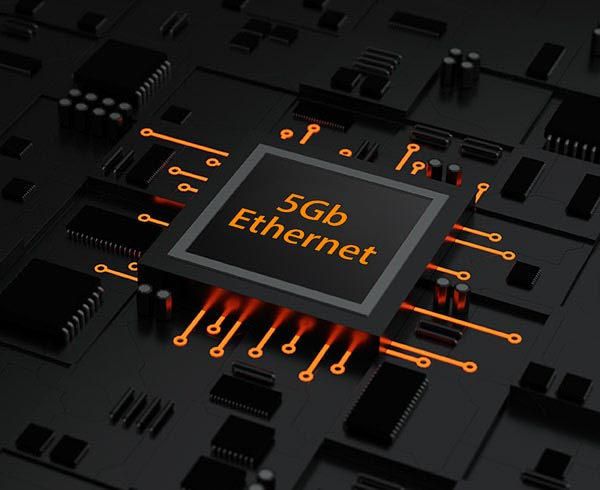
On-board 5Gb Ethernet kicks your LAN connection up a notch by improving bandwidth speeds by up to 5X. Using your existing LAN cable, you can take advantage of this networking upgrade to reduce lag, experience smoother high-resolution video streams, and enjoy faster file transfers.
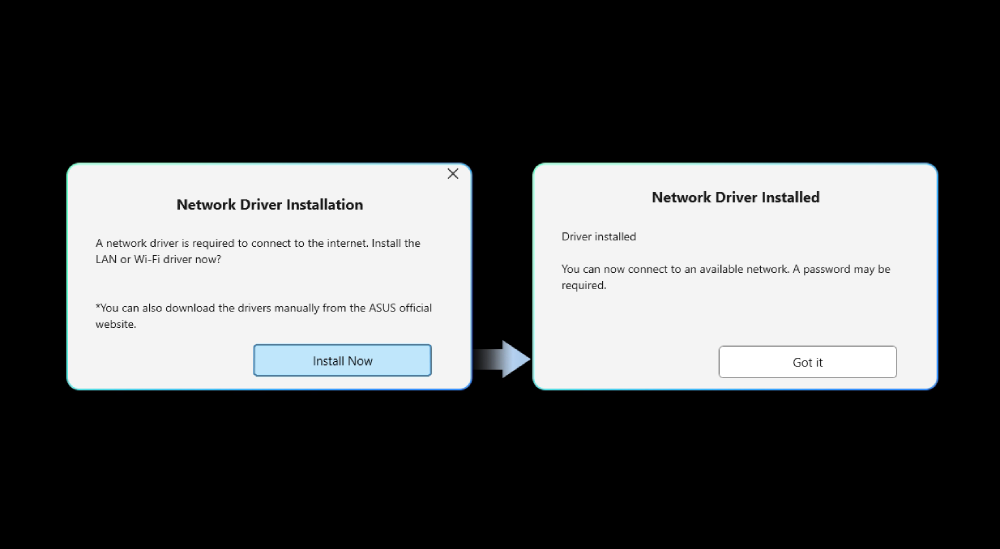
Pre-installed WiFi driver
A pre-installed WiFi driver enables users to connect to the internet when installing Windows on their PC; no USB flash drive is needed for driver installation, making the setup process faster and more convenient*.
* Currently available on ROG Glacial, Dark Hero and select Neo motherboards. Future BIOS updates may prioritize support for new CPUs, potentially affecting WiFi driver integration.
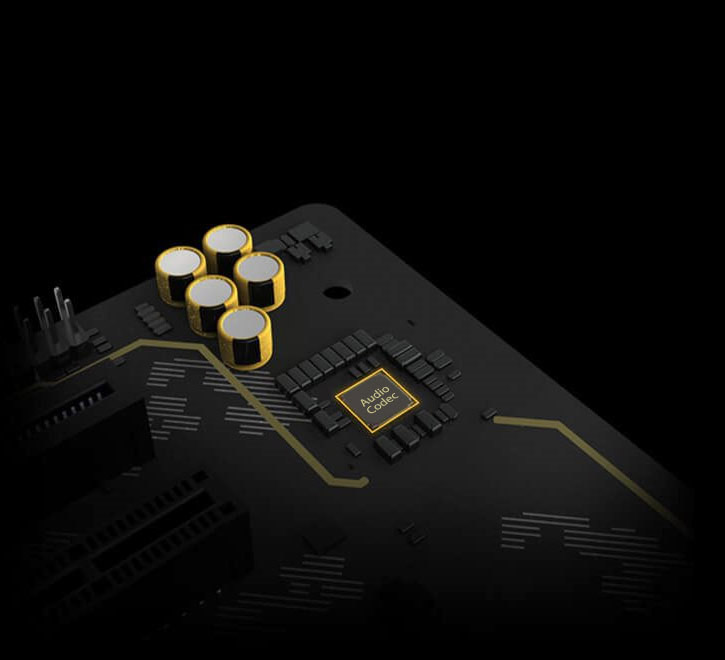
Realtek 7.1 Channel Audio - ALC1220P
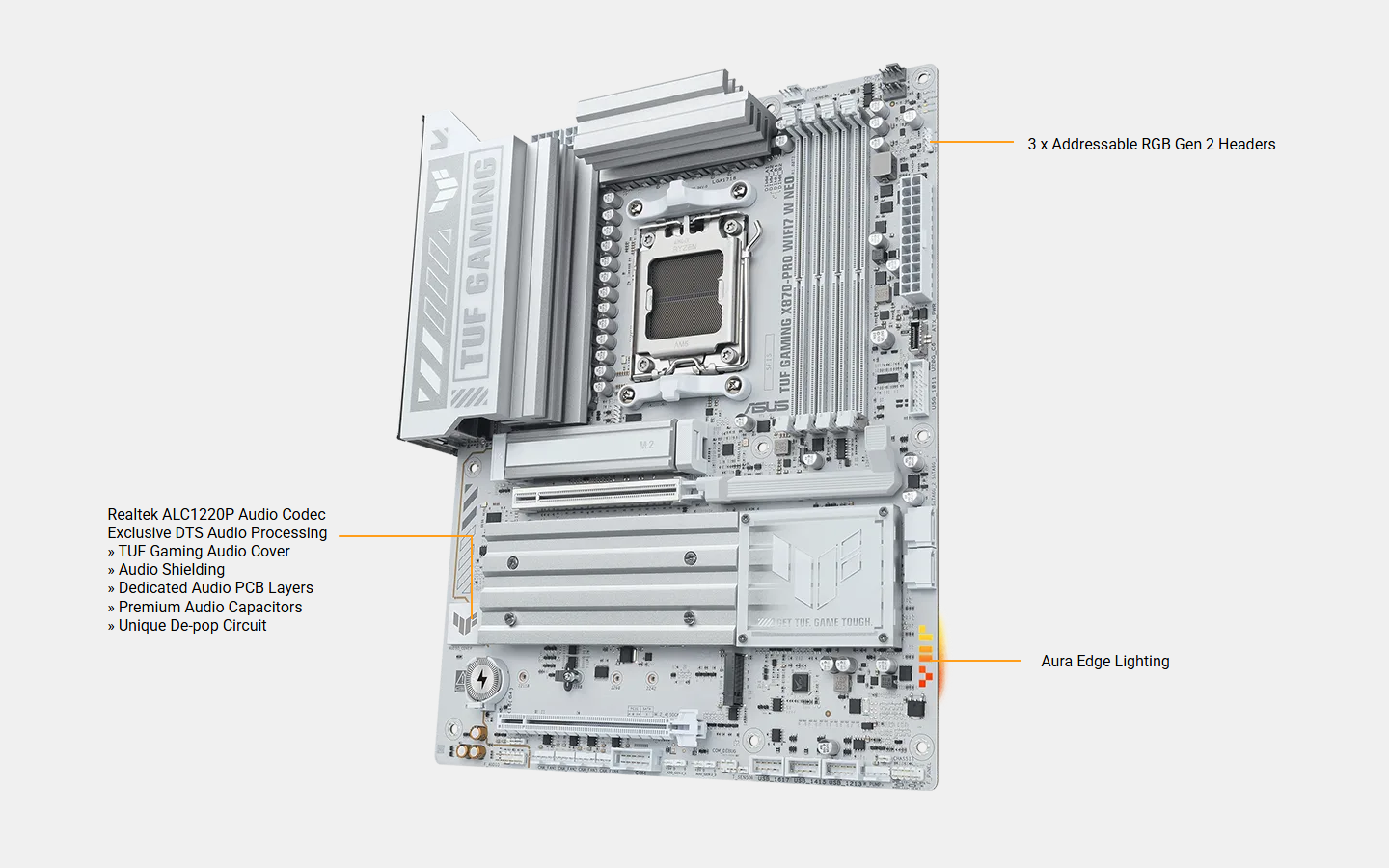
This motherboard utilizes an audio codec designed in close collaboration with Realtek - the Realtek ALC1220P. It features an unprecedented 120 dB signal-to-noise (SNR) ratio for the stereo line out and a 113 dB SNR for the line in, providing pristine audio quality. Additionally, an impedance-sensing circuit automatically adjusts gain to ensure an optimal volume range for your headphones.
* Image for reference only.
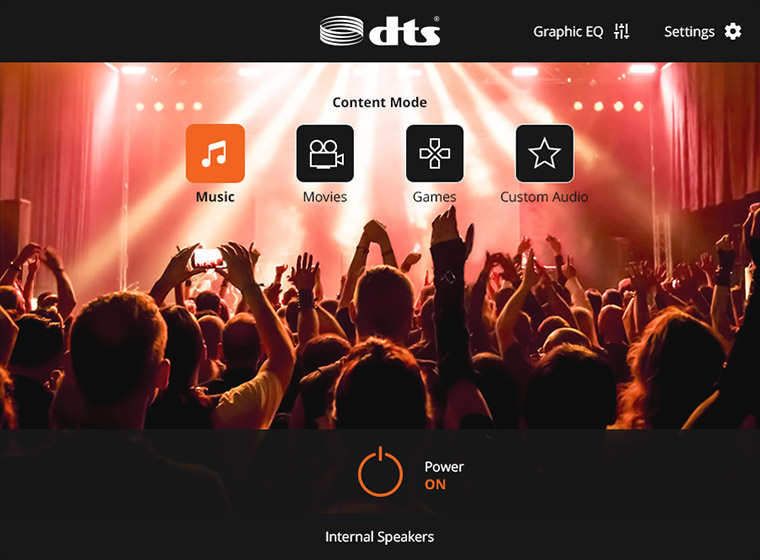
DTS Audio Processing
DTS®Audio Processing enhances gaming headset and speaker audio experiences by reducing distortion and by providing deeper bass, so games, movies and music sound better. It also allows you to customize audio settings.
Bluetooth® LE Audio
The new Bluetooth LE Audio technology standard is a major leap in wireless sound, courtesy of the new LC3 audio codec that delivers higher quality and lower power consumption. It supports low-latency transmission and 3D spatial audio for clearer voice and more immersive gaming sound.

Outshine The Competition
ASUS Aura Sync offers synchronized lighting with other Aura Sync products, including motherboards, graphics cards, monitors and peripherals.

Addressable RGB Gen 2 Headers
Automatically optimize lighting effects for the number of LEDs present in compatible ARGB gear.

Specifications
Reviews
Accessories


Delivery & Pick-up

Delivery Estimates
The estimated time to ship for each product we sell is detailed on the individual product page just underneath the price. From when your items ship, products typically arrive within 1-2 working days for North Island deliveries and 2-3 working days for South Island deliveries. Rural deliveries may take an extra working day. Bulk & hazard deliveries may take an extra 2-7 working days and tracking links for these deliveries can take a few days to generate.
Next Day Delivery
Need your order in a hurry? PB Tech offers next day delivery for local Auckland addresses. Simple place your order before 4pm (provided your items are in stock) and select our next day delivery option in the checkout. T&C's apply. Learn more about Next Day Delivery.
Same Day Delivery
Need your order in a hurry? PB Tech offers same day delivery for Auckland, Hamilton, Wellington and Christchurch. Simple place your order before 1pm (provided your items are in stock) and select one of our same day delivery options 'Evening Delivery' or 'Urgent 3-hour Delivery' in the checkout. T&C's apply. Learn more about Same Day Delivery.
Shipping Costs
Shipping costs vary based on your location and the items being shipped and in some cases shipping may even be FREE.
To calculate what the shipping costs will be for your order, add the items you are interested in to your cart, view the Shopping Cart page, and select your 'Delivery Area' to calculate the shipping cost.
Shipping Security & Insurance
All orders shipped by PB Tech are sent via a courier with a signature required for each delivery. In some cases, and only where you have given the courier company permission to leave orders at a designated location, your order may be delivered without requiring a signature. All orders sent by PB Tech are fully insured in the unlikely event that your item(s) are damaged or go missing in transit.
1 Hour Store Pick-up / Click & Collect
You can pick-up your online order from any of our stores nationwide. You can select which store you want to pick up from at the checkout. Provided the store you select has stock and there's no hold-ups with payment we will have your order ready within 1 hour (during normal trading hours for that store) otherwise it may take up to 5 working days to transfer the stock to the store so your order can be fulfilled. Learn more about our Click & Collect process.
Overseas Shipments
PB Tech regularly ships overseas to Australia and beyond. If you are located in Australia, you can order directly from our Australian site www.pbtech.com/au. If you are from another country you can order from www.pbtech.com
Returns & Warranty
Related Promotions


Popular AMD Desktop Motherboards

 Gigabyte B550M DS3H AC R2 mATX Motherboard For AMD Ryzen 5000...

 ASUS TUF GAMING B650E-E WIFI ATX Motherboard For AMD Ryzen 7000...

 MSI MAG B550M PRO-VDH WIFI mATX Motherboard For AMD 3rd Gen 5000...

 Gigabyte B850M FORCE WIFI6E MATX Motherboard AMD Socket AM5 -...

 ASUS PRIME B650EM-A WIFI mATX Motherboard For AMD Ryzen 7000/8000...


ASUS TUF GAMING X870-PRO WIFI7 W NEO ATX Motherboard For AMD Ryzen 7000/8000/9000 Series CPUs Socket AM5 -AMD X870E Chipset - PCIe 5.0 - 4x M.2 -3x Internal USB 2.0 Header - 1x Internal USB 3.0 Header - 1x Interna Type C Header, WIFI7 + BT
- Brand: ASUS
- MPN: TUF GAMING X870-PRO WIFI7 W NEO
- Part #: MBDASU28716
- UPC:199291425255
Product URL: https://www.pbtech.co.nz/product/MBDASU28716/ASUS-TUF-GAMING-X870-PRO-WIFI7-W-NEO-ATX-Motherboa
| Branch | New Stock | On Display |
|---|---|---|
| Auckland - Albany | 0 | |
| Auckland - Glenfield | 0 | |
| Auckland - Queen Street | 0 | |
| Auckland - Auckland Uni | 0 | |
| Auckland - Westgate | 1 | |
| Auckland - Penrose | 0 | |
| Auckland - Henderson (Express) | 0 | |
| Auckland - St Lukes | 0 | |
| Auckland - Manukau | 0 | |
| Hamilton | 0 | |
| Tauranga | 0 | |
| New Plymouth | 0 | |
| Palmerston North | 2 | |
| Petone | 0 | |
| Wellington | 1 | |
| Auckland - Head Office | 25 | |
| Auckland - East Tamaki Warehouse | 0 | |
| Christchurch - Hornby | 0 | |
| Christchurch - Christchurch Central | 0 | |
| Dunedin | 0 |
Features
TUF GAMING X870-PRO WIFI7 W NEO
ASUS TUF GAMING X870-PRO WIFI7 W NEO takes all the essential elements of the latest AMD Ryzen™ processors and combines them with game-ready features and proven durability. Engineered with an upgraded power solution and a comprehensive cooling system, this motherboard goes beyond expectations with rock-solid and stable performance for marathon gaming. TUF GAMING motherboards also undergo rigorous endurance testing to ensure that they can handle conditions where others may fail. This platform delivers the power and connectivity that advanced AI PC applications demand.
Performance
Cooling
Gaming Immersion
Connectivity
Intelligent - Complete AI Solution
ASUS AI Solutions - including AI Cache Boost, AI Advisor, AI Overclocking, AI Cooling II for thermal control and AI Networking II for real-time bandwidth optimization - offer smart assistance, one click overclocking, efficient cooling and new levels of ultrafast connectivity.
AI CACHE BOOST
Supercharge your large language model (LLM) workflows with AI Cache Boost. Exclusive to ASUS AMD 800 and 600 series motherboards that use Ryzen™ 9000 Series CPUs, this BIOS setting optimizes CPU cache and memory pathways to deliver up to 29% faster local LLM performance with high-speed memory tuning.
AI Advisor
ASUS AI Advisor is an ASUS technical expert that's always available to answer your questions. Owners of compatible ASUS motherboards can interact with this AI-powered technology using natural language to learn more about their hardware. For DIY beginners, it can provide easy-to-understand explanations of one-click optimization features like AI Overclocking and AI Cooling II, and for seasoned PC-building veterans, it can offer guidance and instructions on the latest features offered by ASUS.
* Availability of ASUS AI Advisor may vary by region.
AI Overclocking
Maximized CPU performance, and predictions for ideal CPU and cooling settings, pushing your system to its limits.
AI Cooling II
Optimized thermals, and reduced noise via dynamic adjustment of fan speeds, based on CPU temperatures.
AI Networking II
Optimized network performance, helping to ensure seamless connectivity and maximized WiFi 7 speeds.
Intelligent Overclocking
DYNAMIC OC SWITCHER
Dynamic OC Switcher maximizes CPU performance by letting you set current and temperature thresholds to automatically switch between a manual overlock for heavy multithreaded workloads and Precision Boost Overdrive for single-threaded tasks. The latest Overclocking Load Guard has an enhanced instantaneous current protection mechanism to prevent users from experiencing system crashes during overclocking.
CORE FLEX
Core Flex empowers you to smash limits farther than ever before by letting you control power and thermals in creative new ways. In its simplest form, you can set breakpoints to gradually reduce CPU core frequency as temperature or current increases. But the system is extremely adaptable, supporting multiple user-controlled functions that can manipulate power, current and temperature limits independently so that you can bend CPU performance to your will.
Asynchronous Clock
For next-level frequency flexibility, the TUF GAMING X870-PRO WIFI7 W NEO features a built-in clock generator that isolates CPU base clock from memory, PCIe, and the Infinity Fabric speed. Drive CPU performance to its absolute brink while maintaining the stability of related clock domains. Separate CPU BCLK from other domains for unfettered overclocking.
UEFI BIOS
The UEFI interface delivers easy-to-use configuration options for PC beginners, and advanced features for veterans.
64MB BIOS
A larger BIOS chip enables a more powerful interface and extended CPU compatibility with the latest and future AM5 processors, ensuring a smooth, seamless user experience.
BIOS Q-Dashboard
Simplify your motherboard configuration with BIOS Q-Dashboard. Its intuitive visual representation of hardware connections and corresponding BIOS settings takes the complexity out of setting up your system. Upgrade now, and discover the power of BIOS Q-Dashboard to easily and efficiently enhance your computing setup.
Advanced Tuning for Serious Tweakers
An intuitive Advanced mode offered via the UEFI lets you take complete control. A built-in search feature makes it easy to find options, and various advanced functions let you intelligently make nuanced adjustments so you can dial in performance just the way you want.
ASUS MyHotkey
This feature provides a fast, convenient way to update the BIOS and boot your OS, enhancing PC upgrades with streamlined efficiency for DIY users.
FlexKey
Remap the reset button on the chassis to toggle Aura lighting, activate the DirectKey to go straight to the UEFl BIOS, or reset the system.
Quick and Simple Setup
EZ Mode displays vital settings and stats and also offers guided wizards, drag-and-drop functionality and one-click application of important settings - all to help you get your rig up and running in no time.
Essential OC Control, Simplified
Essential Mode provides quick access to commonly used overclocking settings and key system information, making performance tuning easy without diving into menus that require deeper expertise.
EZ System Tuning
Quickly apply pre-configured profiles for improved system performance or energy savings.
Boost Pro
Enhance system performance by optimizing GPU Boost, AI Cache Boost, and Turbo Game Mode for different usage scenarios.
ASUS MB Manager
ASUS MB Manager delivers fast, fluid, and intuitive control over essential features, offering a smooth experience for monitoring system stats, customizing onboard RGB lighting*, accessing fan cooling controls, and fine-tuning advanced WiFi settings. It also works seamlessly with Armoury Crate to provide an even more comprehensive system management experience.
* ASUS MB Manager controls motherboard RGB lighting only. For cross-product Aura Sync, please use Armoury Crate.
ASUS DriverHub
ASUS DriverHub streamlines the installation and management of ASUS drivers and utilities to keep your hardware up-to-date and performing optimally. This standalone application automatically detects current driver versions and presents available updates in a list view. By default, it supports ASUS motherboards, and users are invited to install ASUS DriverHub after OS installation. Additionally, ASUS DriverHub offers one-click installation and update checks, making it easier for users to keep their systems running smoothly and efficiently.
ASUS GlideX
ASUS GlideX is a cross-device, cross-platform screen-sharing, screen-control and operation solution for enhanced productivity across PCs, tablets and smartphones via USB or WiFi. Features include screen mirroring, screen extension, unified control with one keyboard and mouse, easy file transfers, and using mobile cameras as PC webcams. It is compatible with Windows, macOS, Android and iOS.
Performance - Premium Power Design
Stable power is crucial for maximizing the performance of AMD processors. The motherboard is designed to meet the needs of high-core-count CPUs. It features 16(80A) + 2(80A) + 1(80A) power stages that integrate high-side and low-side MOSFETs and drivers into packages rated for up to 80A each. This configuration ensures optimal power delivery, efficiency, stability and performance for both current and future AMD processors.
- 16 Vcore Power (80A, SPS)
- 2 SOC Power (80A, SPS)
- 1 Misc Power (80A, DrMOS)
Eight-Layer Server-Grade Design
Built on an eight-layer server-grade stack for precise signals and stable performance.
Built on a server-grade eight-layer blueprint, this motherboard's core is engineered for precision. Bus signals for PCIe 5.0 and DDR5 are clean and stable, thanks to controlled impedance and dedicated power/ground layers, while the stiffer structure enhances durability. The result is quieter signal behavior and steadier performance under pressure.
ProCool Power Connectors
Proprietary 8+8 pin connectors improve PSU connection.
Compared to traditional power inputs, ASUS ProCool connectors are built to tight specifications to ensure full contact with PSU power cables. The resulting lower impedance helps prevent hotspots and connector failure.
Digi+VRM Control
Real-time voltage control.
The integrated Digi+ voltage-regulator module (VRM) is one of the finest in the industry, optimized for ultra-smooth and ultra-clean power delivery to the CPU at all times.
Server-Grade DRAM Enhancement
This motherboard features an enhanced memory slot layout that delivers high clock speeds and compatibility with high-capacity DDR5 kits. The refined design supports overclocking of up to 9,600+ MT/s, helping you unlock the full potential of your DDR5 modules-whether you're pushing extreme-speed kits or maximizing entry-level sets*.
* Achievable with advanced BIOS configuration and potentially specialized hardware. Results may vary according to system components.
- Up to DDR5 9600+ MT/s (OC)
DDR5 Dominance
For users looking to push well beyond stock DDR5 speeds, this motherboard is engineered for enthusiast-grade performance with broad AMD Extended Profiles for Overclocking (EXPO™) support and an upgraded memory design tuned for stability at ultra-high frequencies. Veterans can further tweak performance via an extensive array of settings in the UEFI.
ASUS AEMP
ASUS Enhanced Memory Profile (AEMP) is an exclusive firmware feature for PMIC-restricted memory modules. AEMP automatically detects the memory chips on your kit and then presents optimized frequency, timing and voltage profiles that you can quickly apply.
NitroPath DRAM Technology
Frequency up to 400 MT/s higher
Slot retention force enhanced by 57%
DIMM Fit / DIMM Fit Pro
DIMM Fit is an ASUS-exclusive BIOS feature that precisely analyzes individual memory modules to optimize performance and pinpoint potential issues.
DIMM Fit Pro gives advanced PC builders more extensive customizability for memory tuning. It allows users to control up to twenty overclocking parameters, define testing ranges, and prioritize stability or performance, offering a more flexible and granular approach to memory optimization.
Cooling - Cooler by Design
Enlarged VRM Heatsinks
The extensive surface area of this heatsink covers the MOSFETs and chokes to improve thermal performance.
Enlarged M.2 Heatsinks
Three of the four M.2 slots have dedicated heatsinks to help keep M.2 SSDs at optimal operating temperatures and ensure consistent performance and reliability.
Smart Fan Protection
A dedicated integrated circuit protects each fan header from excess heat and electrical currents.
4-Pin PWM/DC Fan
Onboard fan headers support auto-detection of PWM or DC fans.
AIO Pump Header
An integrated AIO management system enables full control of PWM or DC water pumps, making it perfect for custom or all-in-one cooling setups.
Multiple Temperature Sources
Except for the CPU & CPU OPT fan headers, each fan header can be set to monitor and react to up to three user-configurable thermal sensors for workload-based cooling, and all settings can be easily managed through Fan Xpert 4 or via the UEFI.
Fan Xpert 4 allows you to map the temperature of supported ASUS graphics cards to optimize cooling for GPU- and CPU-intensive tasks.
Superb PCH Heatsink
A surface area for the chipset cooler maximizes system performance and heat dissipation.
Water Pump+ Header
A dedicated header supplies 3A for high-performance PWM or DC water pumps.
Cooling - Cooler Compatibility
ASUS AIO coolers offer robust performance, high overclocking potential, bold aesthetics and customizable functionality for new TUF Gaming motherboards, empowering you to build your dream gaming rig.
* Image for reference only.
Connectivity - Empowering Connection
This motherboard offers a versatile range of connectivity with PCIe 5.0, USB4® 40Gbps and front USB 20Gbps Type-C® connectors with Fast Charge support.
PCIe Lane Optimization
Fully utilizes native PCIe 5.0 lanes supported by AMD Ryzen™ 9000 & 7000 CPUs, delivering optimal bifurcation and efficient bandwidth across all scenarios*. Enjoy maximized bandwidth of the first PCIe 5.0 x16 slot and two PCIe 5.0 M.2 slots, when the USB4® 40Gbps ports are not in use.
* Scenarios vary by model.
PCIe 5.0 for Graphics Card
PCIe 5.0 offers twice the data transfer speed of PCIe 4.0, making it robust enough to handle new data-heavy tasks. PCIe 5.0 also brings other benefits, such as electrical changes to improve signal integrity, backward-compatible CEM connectors for add-in cards and backward compatibility with previous versions of the PCIe bus.
USB4® 40Gbps Type-C® Port
Each port delivers up to 40Gbps of bi-directional bandwidth for the latest super-speed devices and drives. Both ports can be employed for up to two external 4K displays.
Front USB 20Gbps Type-C®
This motherboard features a USB 20Gbps Type-C® front panel connector for speedy data transfers of up to 20Gbps. And it offers Power Delivery (PD) 3.0 technology to provide up to 30W of quick charging.
Three USB 2.0 Headers
Three USB 2.0 headers ensure broad compatibility with AIO coolers, chassis fan hubs, front USB modules, and popular third-party components.
Easy PC DIY
PCIe Slot Q-Release
A physical lever unlocks the first PCIe slot's security latch with one tap, greatly simplifying the process of detaching a PCIe card from the motherboard when it's time to upgrade to a new GPU or other compatible device.
M.2 Q-Release
The M.2 heatsink features a convenient switch* to quickly remove it, eliminating the need for tiny screws during SSD installation. Its strong locking mechanism also provides a snug contact surface, helping to ensure reliable heat dissipation for your SSD.
*Switch may be a lever or button, depending on motherboard model.
Q-Antenna
With Q-Antenna, attaching a WiFi antenna to your PC is now easy and fast. Instead of slowly rotating two fasteners until they finally lock in, they just snap into place. Less hassle, and more consistent performance.
M.2 Q-Latch
The innovative ASUS Q-Latch makes it easy to install or remove an M.2 SSD without the need for specific tools or screws. This design employs a simple locking mechanism to secure the drive and neatly detach it with one tap.
Q-LED
The on-board Q-LED troubleshooting lights give PC builders a quick indicator to confirm that key components ― CPU, RAM, graphics card, storage devices ― are functioning normally during startup.
Clear CMOS & BIOS FlashBack™
The Clear CMOS button quickly resets BIOS settings to factory default. lt can also be used to reboot the PC if incorrect BIOS settings have been selected.
BIOS FlashBack™ is a safe and simple way to update BIOS. Just drop the (UEFI) BIOS file onto a FAT32-formatted USB stick, plug it into the USB BIOS FlashBack port, and press the button. Updates can even be performed without having memory or a CPU installed.
DIY Protection
SafeSlot & SafeDIMM
SafeSlot is a reinforced metal sheath integrated with a PCIe slot to keep a card firmly installed and to ensure the highest possible data speeds. The SafeDIMM sheath is integrated to protect memory modules, empowering you to insert them with speed, accuracy and confidence.
ESD Guards
ASUS added special TVS diodes to boost electrostatic discharge prevention by up to +/- 10 kV of air discharge and +/- 6 kV of contact discharge - well above the industry standard.
TUF LANGuard
TUF LANGuard is a military-grade innovation that integrates advanced signal-coupling technology and premium surface-mounted capacitors to improve throughput, helping to protect the motherboard from lightning strikes and static electricity.
Stainless Steel Back I/O Panel
TUF Gaming motherboards feature a corrosion-resistant stainless steel rear I/O panel with up to a 3X longer lifespan. These models pass a rigorous 72-hour salt fog test, surpassing the industry standard.
DIY - Build With Confidence
TUF GAMING Alliance is a collaboration between ASUS and trusted PC component brands to ensure compatibility across a wide range of parts, such as PC cases, power supplies, CPU coolers, memory kits and more. With new partnerships and components being added regularly, the TUF GAMING Alliance will continue to grow even stronger.
Gaming - Ultrafast Networking
Provide a feature-packed high-performance gaming package, with ultrafast networking for smoother online gameplay.
WiFi 7
The next-gen WiFi 7* supports 160 MHz bandwidth in the 6 GHz band and 4096 QAM. Multi-Link Operation (MLO) ensures stable connections and low latency, supporting 2.4, 5, and 6 GHz bands for enhanced coverage and throughput.
* WiFi 7 features require an onboard WiFi chipset, WiFi AP, and WiFi 7-supported operating systems to support the corresponding features. The 6 GHz band may be unavailable in some regions/countries due to regulatory restrictions. Please visit the ASUS support website for more information.
5Gb Ethernet
On-board 5Gb Ethernet kicks your LAN connection up a notch by improving bandwidth speeds by up to 5X. Using your existing LAN cable, you can take advantage of this networking upgrade to reduce lag, experience smoother high-resolution video streams, and enjoy faster file transfers.
Pre-installed WiFi driver
A pre-installed WiFi driver enables users to connect to the internet when installing Windows on their PC; no USB flash drive is needed for driver installation, making the setup process faster and more convenient*.
* Currently available on ROG Glacial, Dark Hero and select Neo motherboards. Future BIOS updates may prioritize support for new CPUs, potentially affecting WiFi driver integration.
Realtek 7.1 Channel Audio - ALC1220P
This motherboard utilizes an audio codec designed in close collaboration with Realtek - the Realtek ALC1220P. It features an unprecedented 120 dB signal-to-noise (SNR) ratio for the stereo line out and a 113 dB SNR for the line in, providing pristine audio quality. Additionally, an impedance-sensing circuit automatically adjusts gain to ensure an optimal volume range for your headphones.
* Image for reference only.
DTS Audio Processing
DTS®Audio Processing enhances gaming headset and speaker audio experiences by reducing distortion and by providing deeper bass, so games, movies and music sound better. It also allows you to customize audio settings.
Bluetooth® LE Audio
The new Bluetooth LE Audio technology standard is a major leap in wireless sound, courtesy of the new LC3 audio codec that delivers higher quality and lower power consumption. It supports low-latency transmission and 3D spatial audio for clearer voice and more immersive gaming sound.
Outshine The Competition
ASUS Aura Sync offers synchronized lighting with other Aura Sync products, including motherboards, graphics cards, monitors and peripherals.
Addressable RGB Gen 2 Headers
Automatically optimize lighting effects for the number of LEDs present in compatible ARGB gear.
Specifications
CPU
AMD Socket AM5 for AMD Ryzen™ 9000 & 8000 & 7000 Series Desktop Processors*
* Refer to https://www.asus.com/support/download-center/ for CPU support list.
Chipset
AMD X870 Chipset
Memory
4 x DIMM slots, max. 256GB, DDR5
Supports up to
8600+MT/s(OC)*/8200+MT/s(OC)** with Ryzen™ 9000 Series Processors,
9600+MT/s(OC)*/9000+MT/s(OC)** with Ryzen™ 8000 Series Processors,
8000+MT/s(OC)*/8000+MT/s(OC)** with Ryzen™ 7000 Series Processors,
ECC and Non-ECC Un-buffered DIMM***
Dual channel memory architecture
Supports AMD Extended Profiles for Overclocking (EXPO™)
Supports DIMM Fit and DIMM Fit Pro
NitroPath DRAM Technology
ASUS Enhanced Memory Profile (AEMP)
* Max Manual Overclocking: Achievable with advanced BIOS configuration and potentially specialized hardware. Passed AIDA64 memory benchmark at this frequency, verifying read/write bandwidth. Results may vary according to system components.
** XMP/EXPO/AEMP Profiles: Rated memory module speeds require setting the BIOS performance profile. Results may vary according to system components and
can be impacted when four DIMM slots are used. For XMP/EXPO/AEMP profile settings, please visit https://rog.asus.com/support/faq/1042256/.
*** Non-ECC, un-buffered DDR5 memory supports On-Die ECC function.
*** Supported memory types, data rate (speed), and number of DRAM modules vary depending on the CPU and memory configuration, for more information please refer to CPU/Memory Support list under the Support tab of product information site or visit https://www.asus.com/support/download-center/. Adjustments will be made based on the specifications of mass-produced memory products available on the market.
Graphics
1 x HDMI™ port**
2 x USB4® (40Gbps) ports support USB Type-C® display outputs***
* Available only on processors featuring integrated graphics. Graphics specifications may vary between CPU types. Please refer to AMD CPU specifications.
** Supports 4K@60Hz as specified in HDMI 2.1.
*** Supports max. 4K@60Hz as specified in DisplayPort 1.4a.
Expansion Slots
AMD Ryzen™ 9000 & 7000 Series Desktop Processors*
1 x PCIe 5.0 x16 slot (supports x16 mode)
AMD Ryzen™ 8000 Series Desktop Processors
1 x PCIe 4.0 x16 slot (supports x8/x4 mode)**
AMD X870 Chipset
1 x PCIe 4.0 x16 slot (supports x4 mode)***
* Please check the PCIe bifurcation table on the support site (https://www.asus.com/support/FAQ/1037507/).
** Specifications vary by CPU types.
*** PCIEX16(G4) slot shares bandwidth with the The M.2_4 slot. When either the PCIEX16(G4) or M.2_4 slot is occupied, that slot runs at PCIe 4.0 x4 mode. When both slots are occupied, each runs at PCIe 4.0 x2 mode. You can enter the BIOS to adjust the default settings as required.
- To ensure compatibility of the device installed, please refer to https://www.asus.com/support/download-center/ for the list of supported peripherals.
Storage
Total supports 4 x M.2 slots and 2 x SATA 6Gb/s ports
AMD Ryzen™ 9000 & 7000 Series Desktop Processors
M.2_1 slot (Key M), type 2280 (supports PCIe 5.0 x4 mode)
M.2_2 slot (Key M), type 2280 (supports PCIe 5.0 x4 mode)*
AMD Ryzen™ 8000 Series Desktop Processors
M.2_1 slot (Key M), type 2280 (supports PCIe 4.0 x4 mode)
M.2_2 slot (Key M), type 2280 (supports PCIe 4.0 x4 mode)**
AMD X870 Chipset
M.2_3 slot (Key M), type 2280 (supports PCIe 4.0 x4 mode)
M.2_4 slot (Key M), type 2242/2260/2280/22110 (supports PCIe 4.0 x4)***
2 x SATA 6Gb/s ports
* The 2 x USB4® (40Gbps) ports share bandwidth with the M.2_2 slot. The USB4 Controller runs at PCIe 4.0 x2 mode when a device is installed in the M.2_2 slot. The M.2_2 slot runs at PCIe x2 mode by default. You can switch M.2_2 to M.2_2 X4 mode in the BIOS, but this will disable the USB4® (40Gbps) ports.
** Specifications vary by CPU types.
*** The M.2_4 slot shares bandwidth with the PCIEX16(G4) slot. When either the PCIEX16(G4) or M.2_4 slot is occupied, that slot runs at PCIe 4.0 x4 mode. When both slots are occupied, each runs at PCIe 4.0 x2 mode. You can enter the BIOS to adjust the default settings as required.
RAID Support
AMD RAIDXpert2 Technology
Ryzen™ 9000 & 8000 & 7000 Series Processors: RAID 0/1/5/10
Ethernet
1 x Realtek® 5Gb Ethernet
TUF LANGuard
Wireless & Bluetooth
Wi-Fi 7 (Realtek® RTL8922AE)
2x2 Wi-Fi 7* (802.11be)
Supports 2.4/5/6GHz frequency band**
Supports Wi-Fi 7 160MHz bandwidth
Bluetooth® v5.4 (suppport LE Audio)***
* Wi-Fi features may vary depending on the operating system.
For Windows 11, Wi-Fi 7 will require 24H2 or later version for full functions, Windows 11 21H2/22H2/23H2 only supports Wi-Fi 6E.
For Windows 10, only Wi-Fi 6 is supported.
** Wi-Fi 6GHz frequency band and bandwidth regulatory may vary between countries.
*** The Bluetooth® version may vary, please refer to the Wi-Fi module manufacturer's website for the latest specifications.
USB
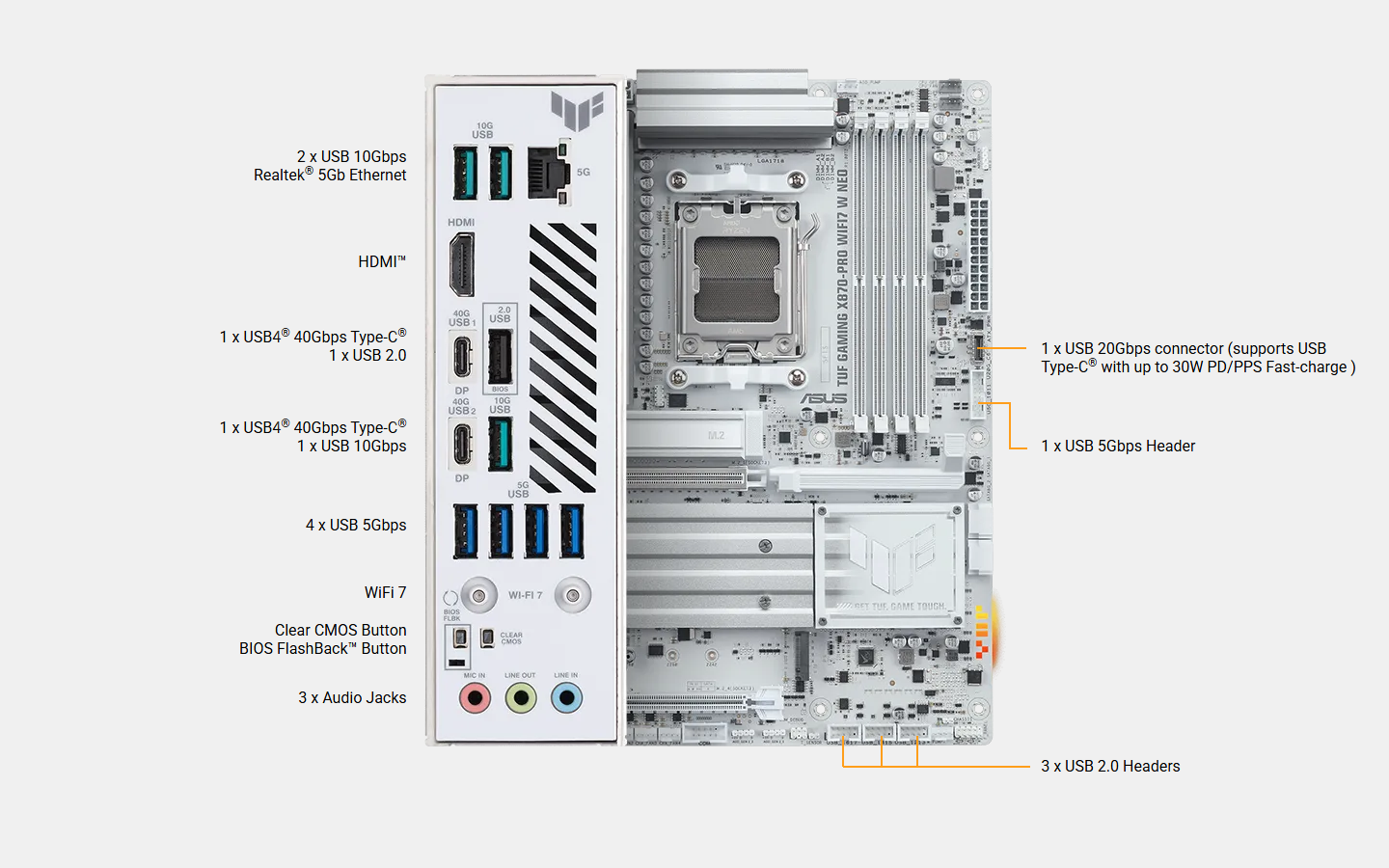
Rear USB (Total 10 ports)
2 x USB4® (40Gbps) ports (2 x USB Type-C®)*
3 x USB 10Gbps ports (3 x Type-A)
4 x USB 5Gbps ports (4 x Type-A)
1 x USB 2.0 port (1 x Type-A)
Front USB (Total 9 ports)
1 x USB 20Gbps connector (supports USB Type-C® with up to 30W PD/PPS Fast-charge )**
1 x USB 5Gbps header supports 2 additional USB 5Gbps ports
3 x USB 2.0 headers support 6 additional USB 2.0 ports
* USB Type-C® power delivery output: max. 5V/3A.
* The 2 x USB4® (40Gbps) ports share bandwidth with the M.2_2 slot. The USB4 Controller runs at PCIe 4.0 x2 mode when a device is installed in the M.2_2 slot. The M.2_2 slot runs at PCIe x2 mode by default. You can switch M.2_2 to M.2_2 X4 mode in the BIOS, but this will disable the USB4® (40Gbps) ports.
** USB Type-C® power delivery output: 5V/9V max. 3A, 12V max. 2.5A, 15V max. 2.0.
Audio
Realtek® ALC1220P 7.1 Surround Sound High Definition Audio CODEC*
- Impedance sense for front and rear headphone outputs
- Internal audio Amplifier to enhance the highest quality sound for headphone and speakers
- Supports: Jack-detection, Multi-streaming, Front Panel Jack-retasking
- High quality 120 dB SNR stereo playback output and 113 dB SNR recording input (Line-in)
- Supports up to 32-Bit/192 kHz playback**
Audio Features
- Audio Shielding
- Premium audio capacitors
- Dedicated audio PCB layers
- Audio cover
- Unique de-pop circuit
* A chassis with an HD audio module in the front panel is required to support 7.1 Surround Sound audio output.
** Due to limitations in HDA bandwidth, 32-Bit/192 kHz is not supported for 7.1 Surround Sound audio.
Back Panel I/O Ports
2 x USB4® (40Gbps) ports (2 x USB Type-C®)
3 x USB 10Gbps ports (3 x Type-A)
4 x USB 5Gbps ports (4 x Type-A)
1 x USB 2.0 port (1 x Type-A)
1 x HDMI™ port
1 x Wi-Fi module
1 x Realtek® 5Gb Ethernet port
3 x Audio jacks
1 x BIOS FlashBack™ button
1 x Clear CMOS button
Internal I/O Connectors
Fan and Cooling Related
1 x 4-pin CPU Fan header
1 x 4-pin CPU OPT Fan header
1 x 4-pin AIO Pump header
4 x 4-pin Chassis Fan headers
1 x W_PUMP+ header
Power Related
1 x 24-pin Main Power connector
2 x 8-pin +12V CPU Power connectors
Storage Related
4 x M.2 slots (Key M)
2 x SATA 6Gb/s ports
USB
1 x USB 20Gbps connector (supports USB Type-C® with up to 30W PD/PPS Fast-charge )
1 x USB 5Gbps header supports 2 additional USB 5Gbps ports
3 x USB 2.0 headers support 6 additional USB 2.0 ports
Miscellaneous
3 x Addressable RGB Gen 2 headers
1 x Chassis Intrusion header
1 x COM Port header
1 x Front Panel Audio header (F_AUDIO)
1 x S/PDIF Out header
1 x 10⁻¹ pin Front Panel System header
1 x Thermal Sensor header
Special Features
Asynchronous Clock
ASUS TUF PROTECTION
- DIGI+ VRM (- Digital power design with SPS)
- ESD Guards
- TUF LANGuard
- Overvoltage protection
- SafeSlot
- Stainless-steel back I/O
ASUS Q-Design
- M.2 Q-Latch
- M.2 Q-Release
- PCIe Slot Q-Release
- Q-Antenna
- Q-Dashboard
- Q-DIMM
- Q-LED (CPU [red], DRAM [yellow], VGA [white], Boot Device [yellow green])
- Q-Slot
ASUS Thermal Solution
- M.2 heatsink
- VRM heatsink design
ASUS EZ DIY
- BIOS FlashBack™ button
- BIOS FlashBack™ LED
- Clear CMOS button
- Dual DIMM clips
- ProCool
- Pre-mounted I/O shield
- SafeDIMM
Aura Sync
- Addressable RGB Gen 2 headers
Front Panel USB 20Gbps with PD Fast Charge Support
- Support: up to 30W fast charging and USB Wattage Watcher
- Output: 5V/9V max. 3A, 12V max. 2.5A, 15V max. 2.0A
- Compatible with PD3.0
Software Features
ASUS Exclusive Software
Armoury Crate
- Aura Creator
- Aura Sync
- Fan Xpert 4 (with AI Cooling II)
- WiFi Q-Antenna
- MLO Wizard
ASUS DriverHub
- ASUS MB Manager
- ASUS AI Advisor
- TUF GAMING CPU-Z
- ASUS GlideX
- USB Wattage Watcher
- TurboV Core
- Norton 360 for Gamers (60 Days Free Trial)
- WinRAR (40 Days Free Trial)
DTS Audio Processing
Adobe Creative Cloud (Free Trial)**
UEFI BIOS
Integrated WiFi Driver Support
AI Overclocking Guide
AI Cache Boost
ASUS EZ DIY
- ASUS CrashFree BIOS 3
- ASUS EZ Flash
- ASUS UEFI BIOS EZ Mode
- ASUS MyHotkey
* For more software features, please visit the asus support site or refer to www.asus.com/support for additional information.
** For detailed information on the supported models and restricted regions for this redemption offer, please refer to https://www.asus.com/content/asus-offers-adobe-creative-cloud/.
BIOS
64MB (512Mb) Flash ROM, UEFI AMI BIOS
Manageability
WOL by PME, PXE
Accessories
Cables
2 x SATA 6Gb/s cables
Miscellaneous
1 x ASUS WiFi Q-Antenna
1 x TUF Gaming sticker
2 x M.2 rubber packages
1 x Screw package for M.2 SSD
Documentation
1 x Quick start guide
Operating System
Windows 11
Form Factor
ATX Form Factor
12 inch x 9.6 inch ( 30.5 cm x 24.4 cm )


