


Makeblock 90107 mBot V1.1 - STEM Robot Kit (Bluetooth Version, Pink) Education Programming Robot
Makeblock 90107 mBot V1.1 - STEM Robot Kit (Bluetooth Version, Pink) Education Programming Robot
- Brand: Makeblock
- MPN: 90107P
- Part #: TOYMKB0055
- UPC:


What PB Tech customers are saying about this product...
See More Reviews"Fantastic present for Miss 8 - she loved building it and then proceeded to play with it for days. Using the remote on its own with no app is great for fun, but using the app to gam ...view more"
Features
What is mBot?
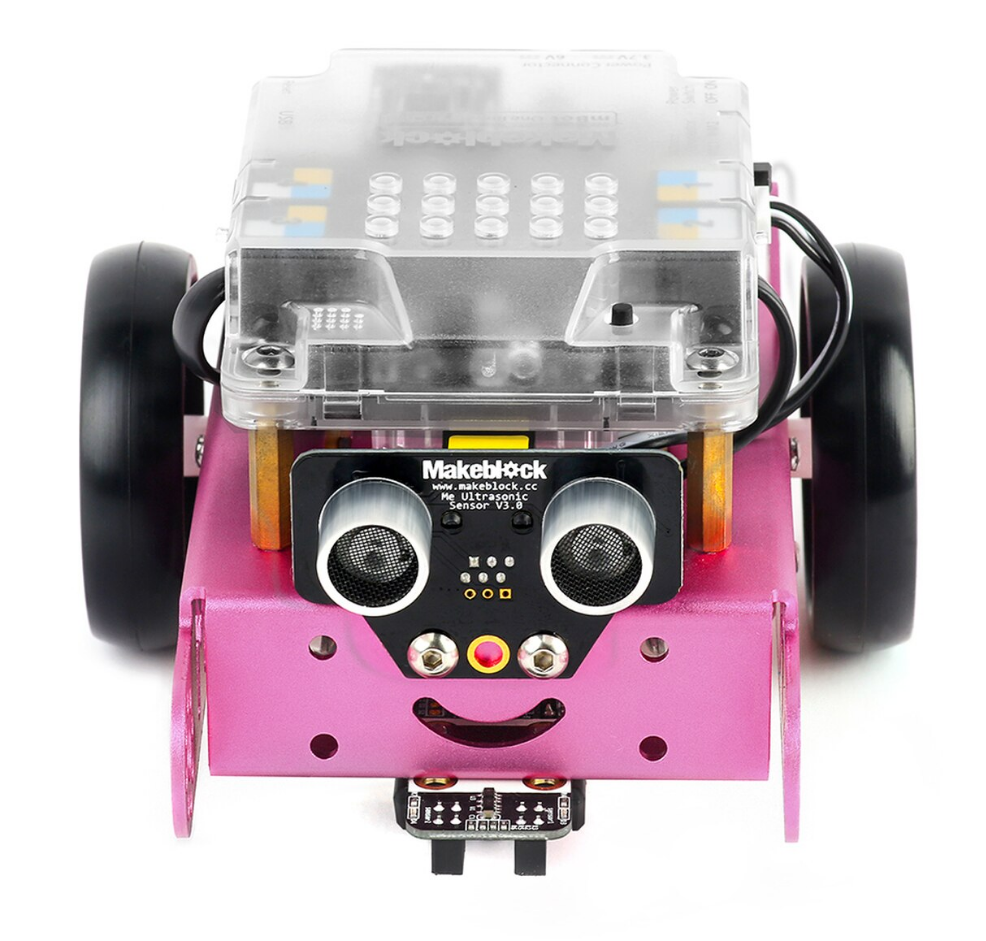
mBot is an all-in-one solution to enjoy the hands-on experience of programming, electronics, and robotics. Working with mBlock inspired by Scratch 2.0, connecting with computers or smart devices via Bluetooth or 2.4G (by different version), this easy-to-assemble mBot provides infinite possibilities for you to learn STEM (Science, Technology, Engineering, Mathematics).
What's New? - Children Safeguard

Compared to the previous verison, mBot V1.1 comes with a casing specially designed for protecting main control board. Meanwhile, the casing is atomized to safeguard children's eyes from the glare of the onboard LED.
What's New? - Better Auxiliary Wheel
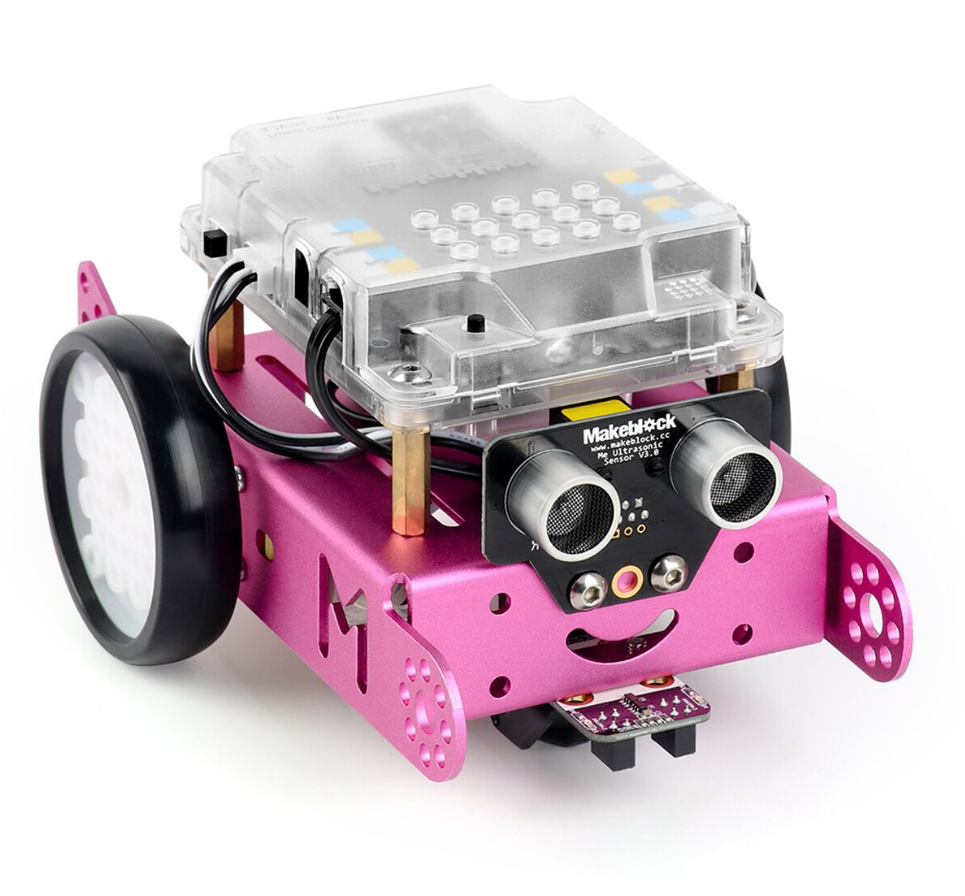
The ball omni-directional wheel of previous version is replaced by a mini nylon caster wheel that performs better when moving to any direction and dramatically reduces the little clack sound caused by a steel ball.
Contracted But Not Simple

Contains 38 assembly parts that can be assembled in 10 minutes and color-labeled RJ25 ports for convenient wiring, making sure more time can be spent on programming and creativity.
Graphical Programming

Drag-and-drop graphical programming software mBlock developed based on Scratch 2.0 provides a quick way to learn programming, control the robot, and realize multiple functions from the robot.
How to connect with Chromebook by Bluetooth?
1. Bluetooth Enabled
2. Turn mBot on and connect to Chromebook
3. Install Coding with Chrome by visiting: https://chrome.google.com/webstore/detail/coding-with-chrome/becloognjehhioodmnimnehjcibkloed
4. Lunch Codeing with Chrome
5. Chose the mBot on Robot section
6. Enjoy it.
Specifications
Reviews
Accessories

Delivery & Pick-up

Delivery Estimates
The estimated time to ship for each product we sell is detailed on the individual product page just underneath the price. From when your items ship, products typically arrive within 1-2 working days for North Island deliveries and 2-3 working days for South Island deliveries. Rural deliveries may take an extra working day. Bulk & hazard deliveries may take an extra 2-7 working days and tracking links for these deliveries can take a few days to generate.
Next Day Delivery
Need your order in a hurry? PB Tech offers next day delivery for local Auckland addresses. Simple place your order before 4pm (provided your items are in stock) and select our next day delivery option in the checkout. T&C's apply. Learn more about Next Day Delivery.
Same Day Delivery
Need your order in a hurry? PB Tech offers same day delivery for Auckland, Hamilton, Wellington and Christchurch. Simple place your order before 1pm (provided your items are in stock) and select one of our same day delivery options 'Evening Delivery' or 'Urgent 3-hour Delivery' in the checkout. T&C's apply. Learn more about Same Day Delivery.
Shipping Costs
Shipping costs vary based on your location and the items being shipped and in some cases shipping may even be FREE.
To calculate what the shipping costs will be for your order, add the items you are interested in to your cart, view the Shopping Cart page, and select your 'Delivery Area' to calculate the shipping cost.
Shipping Security & Insurance
All orders shipped by PB Tech are sent via a courier with a signature required for each delivery. In some cases, and only where you have given the courier company permission to leave orders at a designated location, your order may be delivered without requiring a signature. All orders sent by PB Tech are fully insured in the unlikely event that your item(s) are damaged or go missing in transit.
1 Hour Store Pick-up / Click & Collect
You can pick-up your online order from any of our stores nationwide. You can select which store you want to pick up from at the checkout. Provided the store you select has stock and there's no hold-ups with payment we will have your order ready within 1 hour (during normal trading hours for that store) otherwise it may take up to 5 working days to transfer the stock to the store so your order can be fulfilled. Learn more about our Click & Collect process.
Overseas Shipments
PB Tech regularly ships overseas to Australia and beyond. If you are located in Australia, you can order directly from our Australian site www.pbtech.com/au. If you are from another country you can order from www.pbtech.com
Returns & Warranty
Popular Educational Robotics

 Edison EDL001 EdCreate Edison Robot Creators Kit (The Edison Main...

 Sphero M001RW2 Mini - Activity Kit, Comes with Mini Bot and 15...

 Makeblock P1050017 mBot V1.2 - STEM S.T.E.M. Educational Robot...

 Makeblock mBot Ultimate Robot Kit V2.0 The 10-in-1 STEM S.T.E.M....

 Edison Robot V3.0 Education STEM Internal Rechargeable Battery,...


Makeblock 90107 mBot V1.1 - STEM Robot Kit (Bluetooth Version, Pink) Education Programming Robot
- Brand: Makeblock
- MPN: 90107P
- Part #: TOYMKB0055

Product URL: https://www.pbtech.co.nz/product/TOYMKB0055/Makeblock-90107-mBot-V11---STEM-Robot-Kit-Bluetoot
| Branch | New Stock | On Display |
|---|---|---|
| Auckland - Albany | 0 | |
| Auckland - Glenfield | 0 | |
| Auckland - Queen Street | 0 | |
| Auckland - Auckland Uni | 0 | |
| Auckland - Westgate | 0 | |
| Auckland - Penrose | 0 | |
| Auckland - Henderson (Express) | 0 | |
| Auckland - St Lukes | 0 | |
| Auckland - Manukau | 0 | |
| Hamilton | 0 | |
| Tauranga | 0 | |
| New Plymouth | 0 | |
| Palmerston North | 0 | |
| Petone | 0 | |
| Wellington | 0 | |
| Auckland - Head Office | 10+ | |
| Auckland - East Tamaki Warehouse | 0 | |
| Christchurch - Hornby | 0 | |
| Christchurch - Christchurch Central | 0 | |
| Dunedin | 0 |
Features
What is mBot?
mBot is an all-in-one solution to enjoy the hands-on experience of programming, electronics, and robotics. Working with mBlock inspired by Scratch 2.0, connecting with computers or smart devices via Bluetooth or 2.4G (by different version), this easy-to-assemble mBot provides infinite possibilities for you to learn STEM (Science, Technology, Engineering, Mathematics).
What's New? - Children Safeguard
Compared to the previous verison, mBot V1.1 comes with a casing specially designed for protecting main control board. Meanwhile, the casing is atomized to safeguard children's eyes from the glare of the onboard LED.
What's New? - Better Auxiliary Wheel
The ball omni-directional wheel of previous version is replaced by a mini nylon caster wheel that performs better when moving to any direction and dramatically reduces the little clack sound caused by a steel ball.
Contracted But Not Simple
Contains 38 assembly parts that can be assembled in 10 minutes and color-labeled RJ25 ports for convenient wiring, making sure more time can be spent on programming and creativity.
Graphical Programming
Drag-and-drop graphical programming software mBlock developed based on Scratch 2.0 provides a quick way to learn programming, control the robot, and realize multiple functions from the robot.
How to connect with Chromebook by Bluetooth?
1. Bluetooth Enabled
2. Turn mBot on and connect to Chromebook
3. Install Coding with Chrome by visiting: https://chrome.google.com/webstore/detail/coding-with-chrome/becloognjehhioodmnimnehjcibkloed
4. Lunch Codeing with Chrome
5. Chose the mBot on Robot section
6. Enjoy it.
Specifications
|
Specifications | |||
|
Version |
mBot V1.1-Pink(Bluetooth Version) | ||
|
Packing Method |
Box Packing | ||
|
Product Information |
N.W:0.438kg, DIM(L.D.H):17*13*9 cm | ||
|
Package Information |
G.W:0.90kg, DIM(L.D.H):37*21*5cm | ||
|
Carton Information |
12pcs/ctn, G.W:11.9kg, DIM (L.D.H):38*33*46 cm | ||
|
Inputs |
Light Sensor, Button,IR Receiver, Me Ultrasonic Sensor, Me Line-follower Sensor | ||
|
Outputs |
Buzzer, RGB LED,IR Transmitter, two motor ports | ||
|
Power |
3.7V Lithium battery (charger on board) or four 1.5V AA batteries (not included) | ||
|
Wireless Communication |
Bluetooth(Bluetooth Version) | ||
|
Compatibility |
macOSX, Windows 7 or higher,Linux,iOS 9.0 or higher,Android, Web | ||
|
Part list | |||
|
1 x Mainboard mCore |
2 x Wheel |
1 x Line-follower Map |
6 x M3×25mm Screw |
|
1 x Chassis |
2 x Motor Bracket |
1 x Screwdriver |
15 x M4×8mm Screw |
|
1 x Me Ultrasonic Sensor |
1 x Lithium Battery Holder |
2 x RJ25 Cable |
4 x M2.2 × 9mm Self-drilling Screw |
|
2 x Motor |
1 x AA Battery Holder |
1 x USB Cable |
8 x M3 Nut |
|
1 x Mini Wheel |
2 x Velcro sticker pad |
4 x M4 ×25mm Brass Stud |
1 x IR remote control |
|
1 x Bluetooth Module |
1 x 2.4G Module |
1 x ME Line-follower Sensor |
|

